
Amazon KDP guide, KDP book publishing
Copyright Page Template KDP: Legal Requirements
Mar
Okay so the copyright page thing trips up like 90% of new publishers and honestly I spent my first year on KDP just copying what other people did without really understanding what’s legally required versus what’s just… nice to have I guess.
Here’s the deal – Amazon doesn’t actually require a copyright page at all. Like, legally you could skip it entirely and your book is still copyrighted the moment you create it. But that’s kinda dumb because you’re leaving money and protection on the table, and also it looks super unprofessional when someone opens your planner or notebook and there’s just… nothing there.
The absolute bare minimum you need is the copyright symbol © followed by the year and your name or publishing imprint. That’s it. So like “© 2024 Daniel Harper” and technically you’re good. But I’m gonna walk you through what I actually include because I’ve had to deal with content theft twice now and having a proper copyright page made those DMCA takedowns way easier.
The Basic Template I Use For Every Book
So I’ve got this template saved in Google Docs that I just modify for each book. Takes like 2 minutes max. Here’s what’s in it:
Copyright notice: The © symbol, year of publication, and the copyright holder’s name. If you’re using a pen name or publishing imprint, use that. Don’t use your real name if you’re publishing under a pseudonym because that defeats the whole purpose.
All rights reserved statement: This is where you say “All rights reserved” which basically means people can’t reproduce, distribute, or create derivative works without permission. I know it sounds obvious but you gotta actually state it.
Disclaimer: This is especially important for low-content books like planners, journals, log books. Something like “The publisher is not responsible for websites (or their content) that are not owned by the publisher.” I learned this one the hard way when I included some URLs in a fitness tracker and the website changed to something… not appropriate.
What About ISBN and Publisher Info
Okay so this gets confusing because Amazon gives you a free ISBN but you don’t own it – they do. If you’re only publishing on KDP you can just use their free one and list “Independently published” as your publisher. That’s what I did for my first like 150 books.
But if you buy your own ISBN from Bowker (which is expensive, like $125 for one or $295 for 10), then YOU’re the publisher of record and you need to list yourself or your imprint name. The advantage is you can use that ISBN on other platforms and it looks more professional. I finally bit the bullet last year and bought a pack of 100 ISBNs because I was expanding to IngramSpark and… yeah that’s a whole other conversation.
On your copyright page, if you’re using a free KDP ISBN, you can just skip mentioning it entirely. The ISBN shows up on your Amazon page anyway. If you bought your own, some people include it on the copyright page with “ISBN: 979-8-XXXXXXX-X” but honestly most readers don’t care.
The Stuff You Don’t Legally Need But Should Probably Include
Wait I forgot to mention – there’s a difference between what protects you legally and what makes your book look legitimate. Like, you don’t NEED a disclaimer about medical advice in your fitness journal, but if someone tries to sue you because they hurt themselves using your workout tracker… you’re gonna wish you had it.
Limitation of liability: For any book that could conceivably be used for tracking health stuff, finances, or anything where someone could claim they were harmed by following your book. My template says something like “This book is designed to provide helpful information on the subjects discussed. The publisher and author are not responsible for any specific health, financial, or other needs that may require professional supervision.”
My cat just knocked over my water bottle all over my desk, hold on.
Okay back. So yeah, liability stuff. I have different versions depending on the book type. Recipe journals get a food safety disclaimer. Budget planners get a financial advice disclaimer. You get the idea.
Edition statement: Like “First Edition, March 2024” – this is useful if you ever update the book because you can track which version someone has. I didn’t do this for years and then when I updated a dated planner template I had people emailing me confused about which version they had.
Country of Publication
Some people include “Printed in the United States of America” or wherever. This is more of a traditional publishing thing but it doesn’t hurt. Since KDP prints on demand in multiple locations depending on where the order comes from, I usually just skip this or say “Printed in the country of purchase” which sounds kinda weird but whatever.
The Stuff You Should NOT Include
Okay so funny story – I used to include my personal email address on the copyright page thinking it would help with customer service. Bad idea. I got so much spam and random emails from people wanting me to promote their books or asking me to ghostwrite for them. Now I use a general contact form on my website or just don’t include contact info at all.
Also don’t include:
- Your home address (seriously why would you do this but I’ve seen it)
- Overly specific printing information that’ll be wrong anyway with POD
- Library of Congress numbers unless you actually got one which… you probably didn’t
- Barcode info – that’s auto-generated on the back cover
Formatting The Actual Page
This is gonna sound weird but the formatting matters almost as much as the content. I center-align everything and use a smaller font than the body text – usually 9 or 10pt while my main content is 11 or 12pt.
The copyright page goes on the reverse of your title page, which means it’s on the left side when you open the book. That’s page 2 if you’re counting, or page ii if you’re using Roman numerals for your front matter which is the “proper” way but honestly most low-content books don’t bother with that.
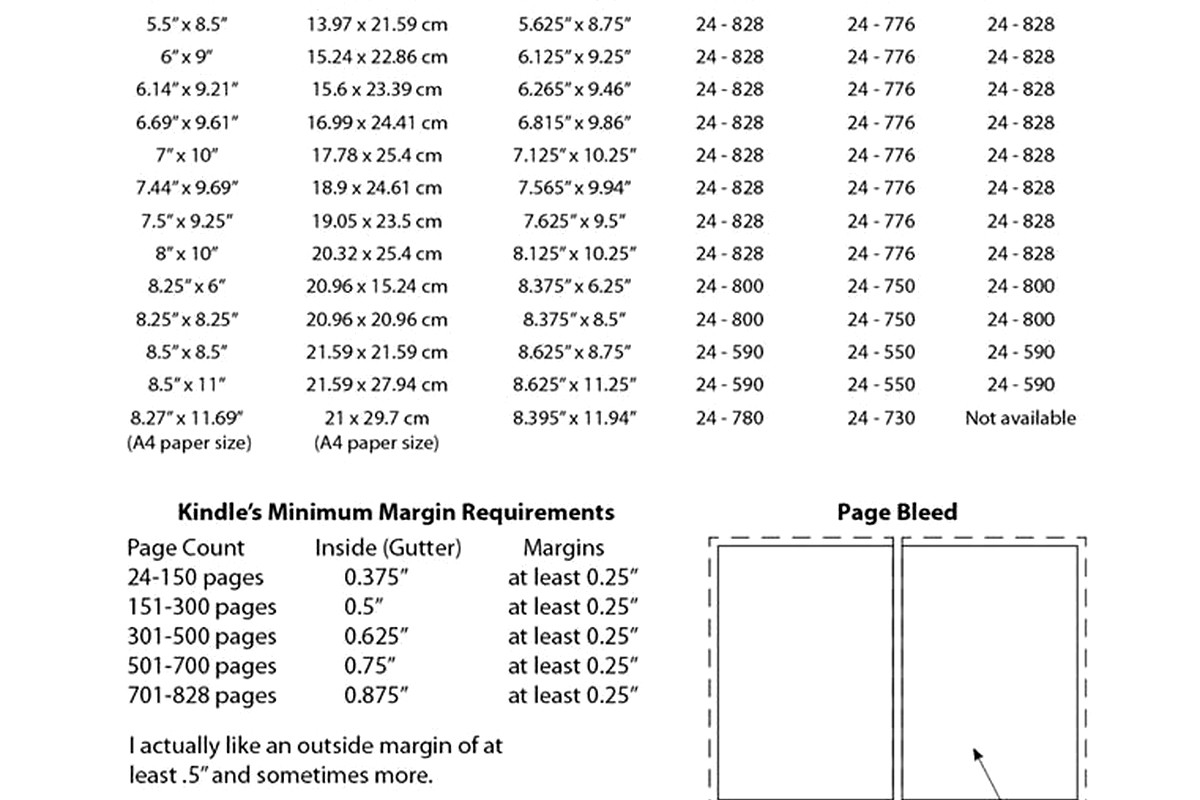
I leave decent margins – like 0.75″ all around – because Amazon’s gonna trim the pages and you don’t want stuff cut off. Also learned that one the hard way when my first proof copy came back with the bottom line of text partially cut off.
For Low-Content Books Specifically
Okay so this is where it gets a bit different from regular books. With low-content stuff like planners, journals, notebooks, you’re not really worried about someone copying your exact text because there often isn’t much text. But you DO need to protect your layouts, designs, and any unique organizational systems.
I include a line that says “The layout, design, and organizational structure of this book are protected by copyright.” Because I had someone literally screenshot my entire planner layout and upload it as their own book. The DMCA takedown was successful partly because I could point to my copyright page stating the design was protected.
For pattern books, coloring books, that kind of thing – be specific. “The illustrations and patterns contained in this book are protected by copyright and are for personal use only. Commercial reproduction is prohibited without written permission.”
The Legal Requirements That Actually Matter
Alright let me get real for a second. The actual legal requirements in the US are minimal. Your work is copyrighted the moment you create it, period. The copyright notice (© year name) isn’t required for protection but it:
- Prevents someone from claiming “innocent infringement”
- Makes it easier to sue for statutory damages
- Looks professional
- Reminds people they can’t just steal your stuff
“All rights reserved” is technically redundant under current copyright law but it doesn’t hurt and it’s still commonly used. It’s more important if you’re distributing internationally in countries that are part of the Buenos Aires Convention, but that’s getting super into the weeds.
The disclaimers and limitations of liability aren’t copyright law – they’re general liability protection. But they’re still important especially for anything that could conceivably cause harm if used incorrectly.
My Actual Template I Copy-Paste
So here’s what I actually use, just modified for each book:
Copyright © [YEAR] by [AUTHOR NAME/IMPRINT]
All rights reserved. No part of this publication may be reproduced, distributed, or transmitted in any form or by any means, including photocopying, recording, or other electronic or mechanical methods, without the prior written permission of the publisher, except in the case of brief quotations embodied in critical reviews and certain other noncommercial uses permitted by copyright law.
Disclaimer: [Custom based on book type – medical, financial, general purpose, etc.]
The information provided in this book is designed to provide helpful information on the subjects discussed. This book is not meant to be used, nor should it be used, to diagnose or treat any medical condition. For diagnosis or treatment of any medical problem, consult your own physician.
First Edition, [MONTH YEAR]
That’s the basic version. For different types of books I swap in different disclaimers.
Oh And Another Thing About Print vs Digital
If you’re doing both paperback and ebook versions on KDP, you technically need copyright pages in both but the ebook one can be simpler. Like you don’t need printing info obviously. I usually just do the copyright notice, all rights reserved, and disclaimer for ebooks.
Also Amazon’s ebook previews show the copyright page to potential buyers so… don’t make it look terrible I guess? Some people go crazy with fancy formatting but I keep it simple.
What About Public Domain Content
This trips people up. If you’re creating a planner or journal with public domain quotes or whatever, your COPYRIGHT covers your specific arrangement and design, not the public domain content itself. So your copyright page should probably clarify that.
Something like “This book contains materials in the public domain. The unique selection, arrangement, and design are copyright © [YEAR] by [NAME].”
I do a lot of prompted journals and sometimes use quotes from old books that are public domain, so I include a line about that. Covers your butt and is technically more accurate.
International Considerations That Probably Don’t Matter But Maybe Do
Okay so technically if you’re selling internationally you’re dealing with different copyright laws. The Berne Convention covers most countries and basically says your US copyright is recognized elsewhere. The “All Rights Reserved” phrase used to be required under the Buenos Aires Convention but that’s mostly obsolete now.
If you’re paranoid you can include both © and ℗ (for sound recordings, but I’ve seen it used for audiobooks). But for print books just © is fine.
I’ve published like 200+ books at this point and never had an international copyright issue, so I wouldn’t stress about this too much unless you’re doing something really specialized.
The main thing is just HAVE a copyright page with the basics. That’s gonna be way more protection than 90% of new publishers who either skip it entirely or copy-paste something without understanding what it means. And when someone inevitably copies your stuff – because they will, it’s happened to me multiple times – having that clear copyright notice makes the takedown process so much simpler.
Just don’t overthink it. Copyright notice, all rights reserved, relevant disclaimer, done. Took me years to stop fiddling with mine trying to make it “perfect” when honestly readers don’t care that much anyway.
DISCOVER OUR FREE BEST SELLING PRODUCTS
Editable Canva Lined Journal: Express Your Thoughts – KDP Template
Lined Pages Journal 120 pages Ready to Upload PDF Commercial Use KDP Template 6×9 8.5×11 5×8 for Notebooks, Diaries, Low Content
Lined Pages Journal 120 pages Ready to Upload PDF Commercial Use KDP Template 6×9 8.5×11 5×8 for Notebooks, Diaries, Low Content
Cute Dogs Coloring Book for Kids | Activity Book | KDP Ready-To-Upload
Daily Planner Diary : Diary Planners for Everyday Productivity, 120 pages, 6×9 Size | Amazon KDP Interior
Wolf Coloring KDP interior For Adults, Used as Low Content Book, PDF Template Ready To Upload COMMERCIAL Use 8.5×11"
Coloring Animals Head Book for Kids, Perfect for ages 2-4, 4-8 | 8.5×11 PDF
Printable Blank Comic Book Pages PDF : Create Your Own Comics – 3 Available Sizes
Notes KDP interior Ready To Upload, Sizes 8.5×11 6×9 5×8 inch PDF FILE Used as Amazon KDP Paperback Low Content Book, journal, Notebook, Planner, COMMERCIAL Use
Black Lined Journal: 120 Pages of Black Lined Paper Perfect for Journaling, KDP Notebook Template – 6×9
Student Planner Journal 120 pages Ready to Upload PDF Commercial Use KDP Template 6×9" 8.5×11" for Low Content book
Recipe Journal Template – Editable Recipe Book Template, 120 Pages – Amazon KDP Interior