-
×
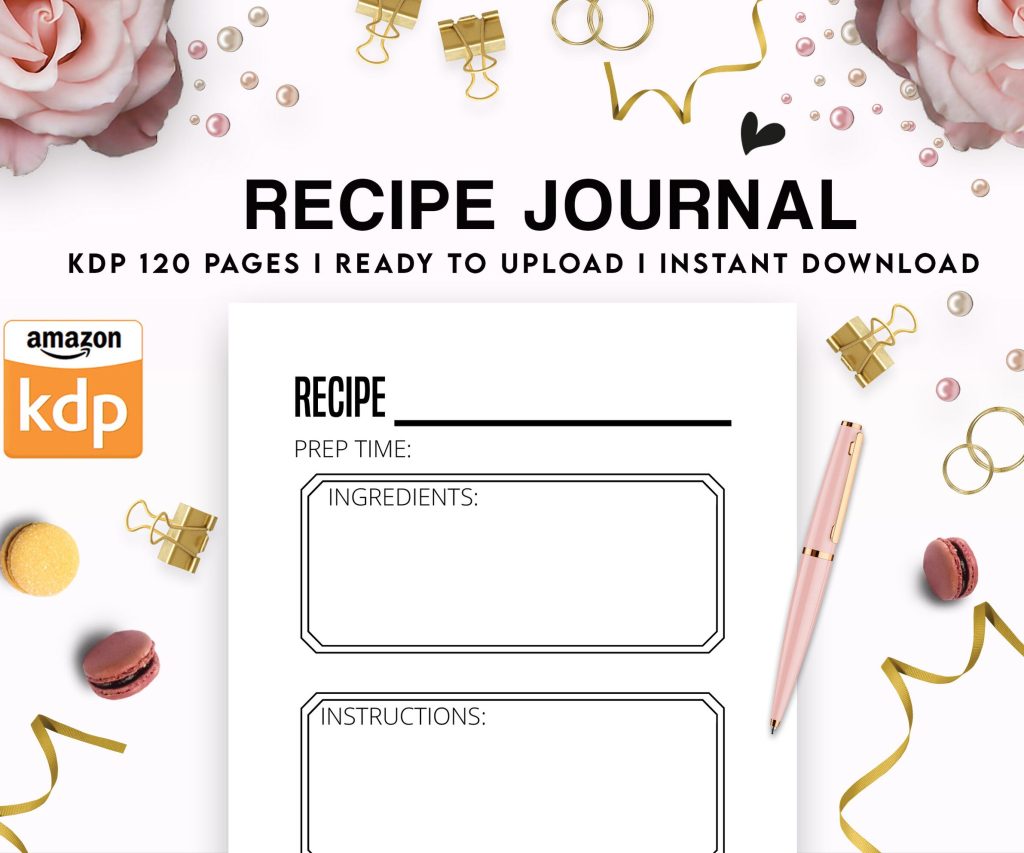 Recipe Journal Template - Editable Recipe Book Template, 120 Pages - Amazon KDP Interior
1 × $0.00
Recipe Journal Template - Editable Recipe Book Template, 120 Pages - Amazon KDP Interior
1 × $0.00
Subtotal: $0.00
 Recipe Journal Template - Editable Recipe Book Template, 120 Pages - Amazon KDP Interior
1 × $0.00
Recipe Journal Template - Editable Recipe Book Template, 120 Pages - Amazon KDP Interior
1 × $0.00 Subtotal: $0.00
Okay so I just uploaded three new ebooks last week and the whole process has changed again, Amazon keeps tweaking stuff but here’s what actually works right now…
You need an Amazon KDP account obviously. Go to kdp.amazon.com and sign up with your regular Amazon login. They’re gonna ask for tax info right away which is annoying but just fill out the W-9 if you’re in the US or the tax interview thing if you’re international. Takes like 10 minutes and yeah they need your bank details for payments.
The dashboard is pretty straightforward once you’re in. Big yellow button that says “Create New Title” and that’s where everything starts. You’ll see options for ebook (Kindle eBook) and paperback, but we’re focusing on digital here.
So manuscript prep is where most people mess up. You can upload a Word doc, PDF, or ePub file. I always use Word because it’s the most forgiving and Amazon’s conversion tool handles it pretty well. Format your manuscript with actual styles in Word, don’t just make text bigger for headings, use the Heading 1 and Heading 2 styles. This matters more than you’d think for the auto-generated table of contents.
Your manuscript needs front matter which sounds fancy but it’s just: title page, copyright page, maybe a dedication if you want, table of contents. Back matter is author bio, other books by you, maybe a call to action. Keep it simple at first.
Oh and another thing, images are tricky in ebooks. They work fine but you gotta compress them first or your file size gets huge and Amazon charges you more per download if the file is over a certain size. I use TinyPNG or whatever free compressor comes up on Google. Keep images under 200KB each if possible.
Your cover needs to be 2560 x 1600 pixels minimum. I know everyone says hire a designer and yeah that’s ideal but when I started I used Canva for like half my books. The free version works fine, pro version gives you more fonts and the background remover which is super useful.
What actually matters: your cover needs to look good as a tiny thumbnail because that’s how 90% of people see it first. Pull up Amazon on your phone and look at search results, that’s the size that matters. Text should be readable, image should be clear, don’t put too much stuff on there.
I made this mistake with my third book where I put like five different elements on the cover and it looked like a mess at thumbnail size. Redid it with just a simple image and bold text, sales picked up.
Back to that Create New Title button. You’ll fill out:
Description needs HTML formatting if you want bold text or italics. Amazon has a preview tool but it’s clunky. I usually write mine in a Google doc first, then paste it in and add the HTML tags. Bold text uses b tags, italics uses i tags. Line breaks are just hitting enter in their editor now, they fixed that finally.
Keywords are huge and everyone overthinks them. Don’t just put “romance” or “thriller” because you’re competing with ten million books. Think about what readers actually search for. Like “billionaire romance with strong heroine” or “psychological thriller with unreliable narrator.” Be specific, use all the characters they give you.
You can price between $0.99 and $9.99 for the 70% royalty option or go outside that range for 35% royalty. Most of my books are $2.99 to $4.99 because that’s the sweet spot. You make about $2 per sale at $2.99 with the 70% royalty.
Wait I forgot to mention KDP Select which is this program where you make your ebook exclusive to Amazon for 90 days and in return you get access to Kindle Unlimited. Readers in KU don’t buy your book, they borrow it and you get paid per page read. Currently it’s about half a cent per page.
Should you enroll in Select? Honestly for your first book I’d say yes because KU readers are voracious and it’s easier to get traction there. You can opt out after 90 days if it’s not working. I have some books in Select and some wide (available everywhere) depending on the genre.
Review process takes like 24-72 hours usually. Sometimes it’s faster, I’ve had books go live in 6 hours. Sometimes they flag something weird and you gotta resubmit. My cat knocked over my coffee during one upload and I had to redo the whole thing which was super annoying but anyway.
Once it’s live you can’t just sit back. Amazon’s algorithm needs data to figure out where to show your book. First few weeks are critical.
Reviews matter a lot. Books with zero reviews don’t sell well because people are skeptical. You need at least 5-10 reviews before things start moving.
You can’t buy reviews or trade reviews with other authors, Amazon will nuke your account. What you CAN do: use Amazon’s “Request a Review” button in your KDP dashboard (shows up 5-30 days after delivery), email your existing audience if you have one, mention in your back matter that reviews help.
Advanced Reader Copies are fine, you give people a free copy before launch in exchange for honest reviews. Emphasis on honest, you can’t require positive reviews.
Okay so funny story, I avoided audiobooks for like three years because I thought they were complicated and expensive. Finally tried it last year and now half my income comes from audiobooks.
ACX is Amazon’s audiobook platform, it’s connected to KDP but separate signup. Same login credentials though. You list your book there and either hire a narrator or record it yourself if you’re brave.
You post your book on ACX with a sample section (usually first chapter or a dramatic scene, something that shows the narrator’s range). Narrators audition by recording that sample. You listen and pick someone.
Payment options:
For your first audiobook I’d try royalty share if you can find a narrator willing to do it. Not all narrators offer it, especially experienced ones. But newer narrators building their portfolio will.
A 50,000 word book becomes roughly a 5-6 hour audiobook. If you’re paying PFH at $200/hour that’s $1,000-1,200 upfront. Gotta sell a lot of audiobooks to break even.
Once you pick a narrator they record in sections and upload for your approval. You listen and can request corrections for mispronunciations or technical issues. Don’t be picky about interpretation unless it’s really wrong, narrators are professionals.
This is gonna sound weird but listen on different devices. I caught some audio issues on my car speakers that I didn’t hear on my laptop. Background noise, breathing sounds, stuff like that.
After approval ACX does quality control which takes 10-20 business days usually. Then your audiobook goes live on Audible, Amazon, and iTunes simultaneously.
You don’t set audiobook prices, Amazon does based on length. But you choose your distribution:
Most people go exclusive at first because that 40% vs 25% is significant. Audible has way more customers than other audiobook platforms anyway.
Whispersync for Voice is cool, it lets customers buy both ebook and audiobook together at a discount. Amazon sets this up automatically if your titles match exactly across KDP and ACX.
Nobody finds your book by accident when you have zero sales history. You need some kind of launch plan.
Amazon ads work if you do them right. Start with automatic campaigns, let Amazon figure out where to show your ads. Budget like $5-10/day for the first week. You’re looking for clicks under $0.50 and ACoS (ad cost of sale) under 70% ideally.
This took me forever to figure out but don’t advertise a book with no reviews. Wait until you have at least 5-10 reviews and a decent cover. Otherwise you’re burning money.
BookBub is the holy grail but hard to get. They feature discounted books to their huge email list. Getting accepted is tough, you need reviews and a price drop. I’ve been accepted maybe 3 times out of 20 submissions.
Newsletter swaps with other authors in your genre work well. You mention their book, they mention yours. Free and effective if you both have engaged readers.
Social media is whatever honestly. I have Twitter and Instagram but they don’t directly sell books for me. More about building long-term audience. Don’t stress about going viral, just be consistent if you’re gonna use it.
Single books are fine but series make way more money. Reader finishes book one, buys book two immediately, that’s the dream.
Price book one lower ($0.99 or $2.99) to get people in, then books 2-4 at $4.99. This is standard now in most genres. I resisted it at first but my series books make literally 5x what my standalone books make.
End each book with a cliffhanger or at least a strong hook for the next one. Include a link to buy the next book in the back matter with a sample chapter.
KDP dashboard shows sales with about a 2-day delay. You’ll see units sold, pages read (if in KU), and estimated royalties. It’s not real-time which is frustrating when you’re starting out and checking every hour like I did.
Payment comes 60 days after the end of each month. So January sales get paid end of March. It’s a long wait for your first payment but then it’s regular.
Download your reports monthly. The “Month-to-Date Unit Sales” report shows exactly which books sold where. I track this in a spreadsheet to see trends.
Watch your also-boughts on your Amazon product page. Those “customers who bought this also bought” recommendations are gold. If you’re showing up next to successful books in your genre you’re doing something right.
Publishing before the book is actually ready. Get beta readers, hire an editor if you can afford it, at minimum use Grammarly and read it out loud yourself. Typos kill your reviews.
Terrible book descriptions. This isn’t a summary of your plot, it’s a sales pitch. Hook them in the first sentence, build intrigue, end with a question or cliffhanger. Look at bestsellers in your genre and model your description after theirs.
Ignoring your back matter. Every book should end with links to your other books, your newsletter signup, and a request for reviews. Readers who finished your book are your hottest leads.
Giving up after one book. I made like $30 my first month. Didn’t hit $1000/month until I had 8 books published. It compounds over time.
Not building an email list from day one. This was my biggest mistake. Started collecting emails after 15 books and had to rebuild an audience from scratch. Put a newsletter signup link in every book and actually email people when you launch something new.
Anyway that’s the core stuff, there’s obviously more advanced tactics but this’ll get you from zero to actually having books generating income on Amazon.
DISCOVER OUR FREE BEST SELLING PRODUCTS
Editable Canva Lined Journal: Express Your Thoughts – KDP Template
Lined Pages Journal 120 pages Ready to Upload PDF Commercial Use KDP Template 6×9 8.5×11 5×8 for Notebooks, Diaries, Low Content
Lined Pages Journal 120 pages Ready to Upload PDF Commercial Use KDP Template 6×9 8.5×11 5×8 for Notebooks, Diaries, Low Content
Cute Dogs Coloring Book for Kids | Activity Book | KDP Ready-To-Upload
Daily Planner Diary : Diary Planners for Everyday Productivity, 120 pages, 6×9 Size | Amazon KDP Interior
Wolf Coloring KDP interior For Adults, Used as Low Content Book, PDF Template Ready To Upload COMMERCIAL Use 8.5×11"
Coloring Animals Head Book for Kids, Perfect for ages 2-4, 4-8 | 8.5×11 PDF
Printable Blank Comic Book Pages PDF : Create Your Own Comics – 3 Available Sizes
Notes KDP interior Ready To Upload, Sizes 8.5×11 6×9 5×8 inch PDF FILE Used as Amazon KDP Paperback Low Content Book, journal, Notebook, Planner, COMMERCIAL Use
Black Lined Journal: 120 Pages of Black Lined Paper Perfect for Journaling, KDP Notebook Template – 6×9
Student Planner Journal 120 pages Ready to Upload PDF Commercial Use KDP Template 6×9" 8.5×11" for Low Content book
Recipe Journal Template – Editable Recipe Book Template, 120 Pages – Amazon KDP Interior