
-
×
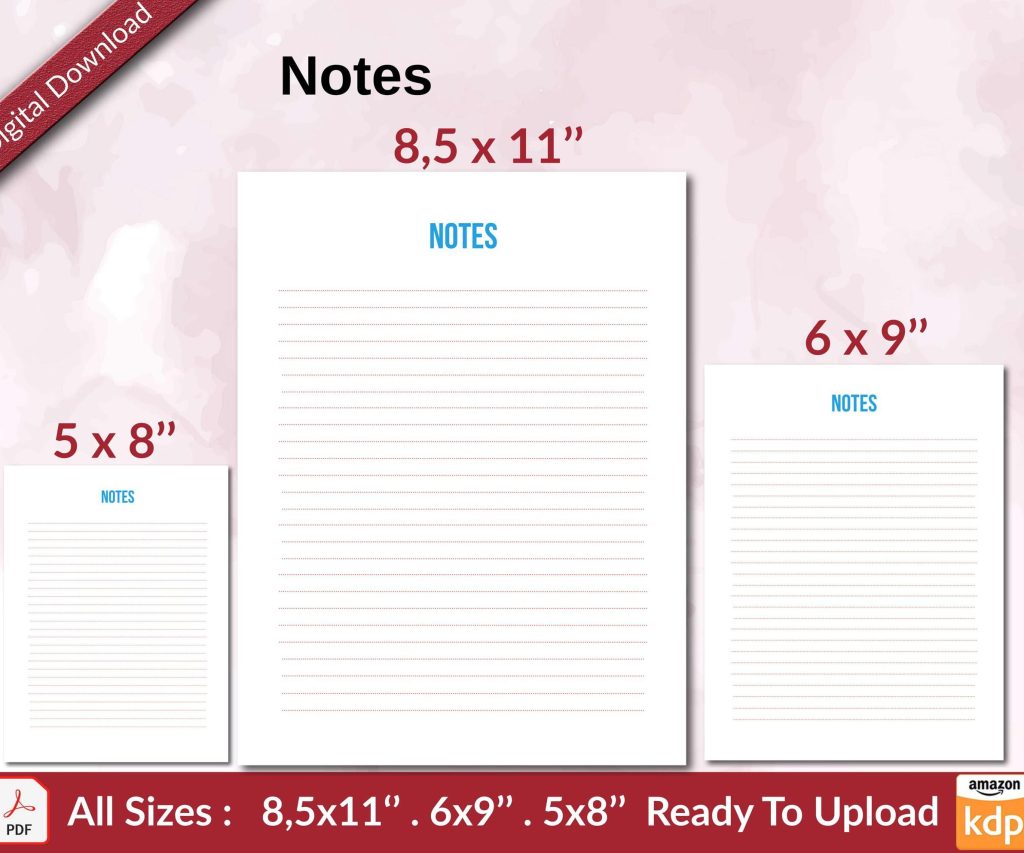 Notes KDP interior Ready To Upload, Sizes 8.5x11 6x9 5x8 inch PDF FILE Used as Amazon KDP Paperback Low Content Book, journal, Notebook, Planner, COMMERCIAL Use
1 × $0.00
Notes KDP interior Ready To Upload, Sizes 8.5x11 6x9 5x8 inch PDF FILE Used as Amazon KDP Paperback Low Content Book, journal, Notebook, Planner, COMMERCIAL Use
1 × $0.00
Subtotal: $0.00
Okay so KDP is basically Amazon’s self-publishing platform and I’ve been using it since like 2017, made over $200k from it which sounds insane but it’s really just about understanding how the system works and not overthinking it.
First thing you gotta do is go to kdp.amazon.com and sign up with your regular Amazon account. They’re gonna ask for tax info immediately which freaked me out at first but it’s just a W-9 if you’re in the US or a W-8 if you’re international. The tax interview takes maybe 5 minutes and yeah you need your SSN or EIN ready.
Payment setup is next and this is where people get weird about it… just link your bank account directly. I tried using checks way back when and it was a nightmare, took forever. Direct deposit hits your account like 60 days after the end of each month which I know sounds slow but that’s just how Amazon rolls.
So there’s eBooks and paperbacks, and you can do both for the same book which is actually smart because some people only buy physical copies. I started with just eBooks because it felt less intimidating but honestly paperbacks aren’t that much harder.
For eBooks you need your manuscript in DOC, DOCX, or EPUB format. Amazon converts everything to their proprietary format anyway so don’t stress too much about perfection here. The previewer tool they have is actually pretty decent for catching formatting issues before you publish.
Paperbacks need a PDF and this is where it gets slightly more technical. Your interior needs to be formatted correctly with margins that account for the binding, and the trim size matters—like 6×9 is standard for most books but I do 8.5×11 for low-content stuff like journals and planners because it looks more substantial.
Amazon has this free Cover Creator tool that everyone says is garbage but honestly for low-content books it works fine. I’ve used it for probably 50+ books and they sell. For eBooks with actual content though, yeah you want something better.
Canva Pro is like $13/month and worth every penny. I design all my covers there now and the templates are actually good. You can also hire designers on Fiverr for $15-50 but watch out because some of them just use Canva templates anyway and charge you more.
The cover dimensions are specific—for eBooks it’s recommended 2560 x 1600 pixels, but I usually go bigger like 3200 x 2000 because Amazon compresses everything anyway. For paperbacks you need to download the template based on your page count because the spine width changes. This tripped me up so many times in the beginning.
Amazon pays you based on this royalty structure and it’s kinda complicated. For eBooks you can choose 35% or 70% royalty but the 70% option only works if you price between $2.99-$9.99 and there are delivery costs they deduct based on file size.
I price most of my eBooks at $2.99 because that’s the sweet spot where you get the 70% royalty but it’s still an impulse buy. My dog just knocked over my coffee but anyway… for longer books or ones in competitive niches I’ll go up to $4.99-$6.99.
Paperbacks are different because Amazon calculates printing costs based on page count and ink. A 120-page black and white paperback costs them like $2.50 to print, so if you price it at $7.99 you’re making maybe $1.50 per sale after their cut. The royalty rate for paperbacks is 60% of list price minus printing costs.
You get 7 keyword boxes and this is where most people screw up. Don’t waste them on single words like “romance” or “cookbook”… you want phrases that people actually search for. I use Publisher Rocket which is like $97 one-time and it shows you actual search volume data from Amazon.
Wait I forgot to mention—you also pick two categories when you publish but you can email KDP support and ask to be added to up to 8 additional categories. I do this for every single book now and it’s increased my visibility so much. Just send a polite email with your ASIN and the category paths you want.
Okay so this is gonna sound weird but low-content books (journals, planners, notebooks, logbooks) are way easier to make and can be super profitable. I have a series of gardening journals that brings in like $800/month and I made them in two days using templates.
The thing with low-content is you need good interiors and there are people who sell these on Etsy or Creative Fabrica. I bought a membership to Creative Fabrica for $99/year and downloaded hundreds of interiors—totally worth it. You just customize the cover and upload.
Content books (actual written books) take more time obviously but the royalties can be better long-term. I’ve got a few niche non-fiction books about Kindle publishing and digital planning that make decent passive income. These took me weeks to write but they keep selling.
Once you’re in KDP click the big yellow “Create” button and choose Kindle eBook or Paperback. The form is pretty straightforward but here’s what trips people up:
Your book title can’t be changed easily after publishing so choose carefully. Subtitles are clutch for SEO—stuff it with keywords but make it sound natural. Like “Meal Prep Cookbook: 100 Easy Recipes for Busy People to Save Time and Eat Healthy” or whatever.
The description field supports HTML which most people don’t use. I format mine with headers and bullet points using basic HTML tags and it looks way more professional. There are free tools online that convert formatted text to Amazon-friendly HTML.
For contributors you’re gonna list yourself as author obviously, but if you used a ghostwriter or editor you can add them here too. It doesn’t affect royalties, just credits.
Amazon gives you a free ISBN for paperbacks which is fine for most people. The only downside is it lists “Independently published” as your publisher name. If you want your own imprint name you gotta buy your own ISBN from Bowker which is like $125 for one or $295 for 10.
I bought the 10-pack in 2019 and still have 3 left. It’s nice having my own publishing company name on there but honestly it doesn’t affect sales at all. eBooks don’t need ISBNs, Amazon just assigns an ASIN automatically.
For eBooks keep it simple—use styles in Word for your headings and chapter titles, don’t manually bold or size things. Amazon’s conversion works better with proper styles. Add a clickable table of contents using Word’s TOC feature and it’ll work in the Kindle version.
Paperbacks are trickier because you’re dealing with physical page layout. I use Atticus software now which is $147 one-time and it formats both eBook and print versions perfectly. Before that I was using Word templates and manually adjusting margins which was tedious as hell.
Bleed is something you need to understand for paperbacks—it’s the 0.125 inch extra on all sides where images or backgrounds extend beyond the trim line. If you have full-page images or colored backgrounds you need bleed setup correctly or you’ll get white edges after trimming.
When you publish an eBook you can enroll in KDP Select which makes it exclusive to Amazon for 90 days. The benefit is your book gets into Kindle Unlimited where subscribers can read it free and you get paid per page read.
I enroll most of my books in KDP Select because the page reads often earn more than sales. Like I’ve got books that make $300/month just from KU page reads with barely any actual sales. The rate changes but it’s usually around $0.004 per page read.
The downside is you can’t sell that eBook anywhere else—no Apple Books, no Kobo, no Google Play. For me it’s worth it but some people prefer going wide to all platforms. You can opt out after the 90-day period if you want.
Publishing the book is literally 20% of the battle. You need eyeballs on it and Amazon’s algorithm favors books that get early sales and reviews.
I always line up like 10-15 people before launch who’ll buy it day one and hopefully leave reviews. These are friends, family, people in my Facebook groups, whatever. Those first 48 hours really matter for ranking.
Amazon Ads are pretty much necessary now. I run automatic campaigns at like $5/day budget for new books just to get data on what keywords convert. After a week or two I’ll create manual campaigns using the keywords that worked.
The ad dashboard is confusing at first but basically you’re bidding on keywords or products. I usually start at $0.30-$0.50 bids and adjust based on performance. If your ACoS (advertising cost of sales) is under 60% you’re probably profitable depending on your royalty.
You can’t offer free books in exchange for reviews anymore, Amazon shut that down years ago. But you can use Amazon’s request review button in your KDP dashboard which sends an automated email to buyers asking for a review.
I click that for every single sale and maybe 1 in 20 people actually leave a review. It’s low but it adds up over time. Getting to 10+ reviews really helps conversion because people trust books with social proof.
Oh and another thing—join some Facebook groups for authors in your niche. Not to spam your book but to genuinely connect with readers. I’m in like 8 different publishing groups and occasionally people discover my books organically through my comments and posts.
Terrible covers that look homemade—just spend the $20 on Fiverr if you can’t design. Your cover is doing 80% of the selling.
Keyword stuffing in the title that makes no sense. Amazon’s been cracking down on this and can suppress your book if it’s too spammy.
Not checking the preview file before publishing. I’ve seen books go live with formatting disasters because people skipped this step. Always download the preview and check it on multiple devices.
Giving up after two weeks because the book didn’t go viral. KDP is a long game, most of my income comes from books I published 2-3 years ago that just consistently sell a few copies per week.
Don’t expect to make anything meaningful your first month or even first few months unless you get super lucky or already have an audience. My first book made $47 in its first month and I thought that was amazing.
Now I’ve got like 200+ books published and monthly income ranges from $5k-$30k depending on season and how many new books I’m launching. December is always huge because of gift buying, summer can be slow.
The beauty is once a book is up it can sell forever with minimal effort. I’ve got books from 2018 that still bring in $50-100/month each without me touching them. That compounds when you have dozens or hundreds of books.
Just start with one book, learn the process, then replicate what works. I was watching The Office for the millionth time when I published my first book and had no idea it would turn into an actual business but here we are seven years later.
DISCOVER OUR FREE BEST SELLING PRODUCTS
Editable Canva Lined Journal: Express Your Thoughts – KDP Template
Lined Pages Journal 120 pages Ready to Upload PDF Commercial Use KDP Template 6×9 8.5×11 5×8 for Notebooks, Diaries, Low Content
Lined Pages Journal 120 pages Ready to Upload PDF Commercial Use KDP Template 6×9 8.5×11 5×8 for Notebooks, Diaries, Low Content
Cute Dogs Coloring Book for Kids | Activity Book | KDP Ready-To-Upload
Daily Planner Diary : Diary Planners for Everyday Productivity, 120 pages, 6×9 Size | Amazon KDP Interior
Wolf Coloring KDP interior For Adults, Used as Low Content Book, PDF Template Ready To Upload COMMERCIAL Use 8.5×11"
Coloring Animals Head Book for Kids, Perfect for ages 2-4, 4-8 | 8.5×11 PDF
Printable Blank Comic Book Pages PDF : Create Your Own Comics – 3 Available Sizes
Notes KDP interior Ready To Upload, Sizes 8.5×11 6×9 5×8 inch PDF FILE Used as Amazon KDP Paperback Low Content Book, journal, Notebook, Planner, COMMERCIAL Use
Black Lined Journal: 120 Pages of Black Lined Paper Perfect for Journaling, KDP Notebook Template – 6×9
Student Planner Journal 120 pages Ready to Upload PDF Commercial Use KDP Template 6×9" 8.5×11" for Low Content book
Recipe Journal Template – Editable Recipe Book Template, 120 Pages – Amazon KDP Interior