-
×
 Daily Planner Diary : Diary Planners for Everyday Productivity, 120 pages, 6×9 Size | Amazon KDP Interior
1 × $0.00
Daily Planner Diary : Diary Planners for Everyday Productivity, 120 pages, 6×9 Size | Amazon KDP Interior
1 × $0.00
Subtotal: $0.00
 Daily Planner Diary : Diary Planners for Everyday Productivity, 120 pages, 6×9 Size | Amazon KDP Interior
1 × $0.00
Daily Planner Diary : Diary Planners for Everyday Productivity, 120 pages, 6×9 Size | Amazon KDP Interior
1 × $0.00 Subtotal: $0.00
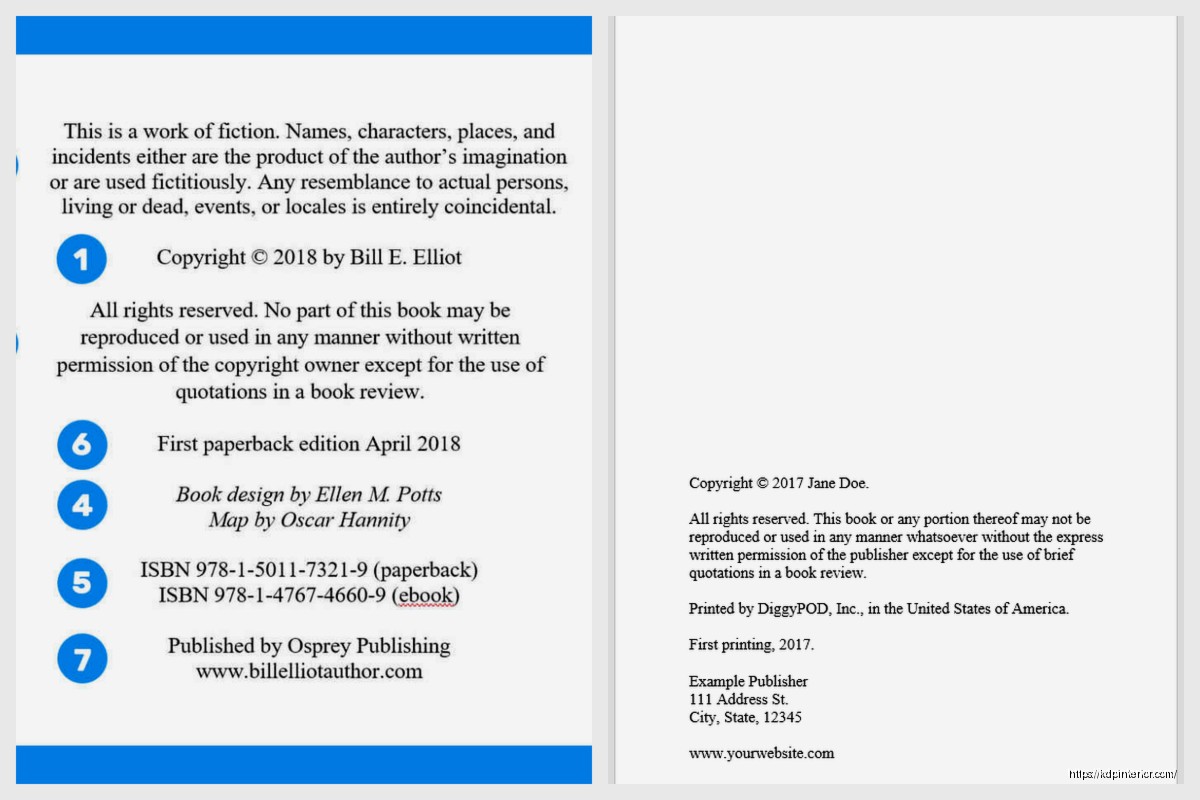
Okay so copyright pages are honestly one of those things most new publishers completely overthink or skip entirely and both approaches will bite you later. I spent like three months ignoring mine when I first started and then got a weird email from someone claiming I’d stolen their content (I hadn’t) but had zero legal protection documented anywhere because my books just… didn’t have proper copyright pages.
Here’s the deal with copyright pages – they’re basically your legal shield and your professional credibility all wrapped into one boring-looking page. Most readers skip right past them but they need to exist and they need specific elements or you’re leaving yourself exposed.
So at minimum your copyright page needs the copyright symbol or the word “Copyright” followed by the year and your name or publishing entity. Like literally:
Copyright © 2024 Daniel Harper
That’s the bare minimum. But that’s also kinda useless by itself because it doesn’t actually protect you from much without the other elements. Think of it like… I dunno, locking your front door but leaving all the windows wide open.
The copyright notice I just mentioned, yeah, but also you need an “All Rights Reserved” statement or specific Creative Commons licensing if you’re going that route. All Rights Reserved means exactly what it sounds like – nobody can reproduce, distribute, or create derivative works from your content without permission.
Then you gotta have your publisher information. If you’re self-publishing under your own name, that’s fine. If you created an imprint name (which I recommend honestly because it looks more professional), put that. Mine is “Harper Digital Press” which sounds way better than just slapping my name on everything.
Oh and another thing – the edition statement. First Edition, Second Edition, whatever. This matters more than you’d think because if you update content later, you need to distinguish between versions for legal and practical reasons.
This trips people up constantly. Your ISBN needs to be on the copyright page along with where it was printed. For KDP books I usually write something like “Printed by Amazon” or “Independently Published” depending on the format.
If you bought your own ISBNs (which I recommend if you’re serious about this), list them clearly:
Each format needs its own ISBN. Amazon will give you free ones but then Amazon is listed as the publisher of record which… some people care about, some don’t. I started buying my own around book 15 when I realized I was gonna keep doing this long-term.
Okay so this is where it gets important especially for non-fiction. You need disclaimers that protect you from liability. I learned this the hard way when someone tried to sue me over a productivity planner because they claimed following my advice made them miss a work deadline. Case got thrown out but only because I had solid disclaimers.
For informational content, something like: “The information provided in this book is for educational purposes only. The author and publisher are not responsible for any actions taken based on the information contained herein.”
For planners, journals, low-content books: “This planner is intended for personal use only. Results may vary based on individual circumstances.”
Wait I forgot to mention – if you’re using any trademarked terms or brand names even in passing, you need a trademark disclaimer too. Something like “All trademarks and brand names mentioned are the property of their respective owners and are used for identification purposes only.”
Let me show you what I use for different book types because the template changes slightly depending on what you’re publishing.
Copyright © 2024 Daniel Harper. All rights reserved.
No part of this publication may be reproduced, distributed, or transmitted in any form or by any means, including photocopying, recording, or other electronic or mechanical methods, without the prior written permission of the publisher, except in the case of brief quotations embodied in reviews and certain other non-commercial uses permitted by copyright law.
Published by Harper Digital Press
ISBN: 978-1-XXXXXX-XX-X
First Edition
Printed by Amazon
Disclaimer: This planner is intended for personal organizational use only. The publisher and author assume no responsibility for errors, omissions, or damages resulting from the use of the information contained herein.
That’s pretty much my standard template. It’s formal enough to be legally sound but not so complicated that it takes up three pages.
This needs beefier disclaimers honestly. I add stuff about how the content isn’t professional advice, medical advice, legal advice, financial advice – whatever’s relevant to your topic.
Copyright © 2024 Daniel Harper. All rights reserved.
No part of this book may be reproduced or transmitted in any form or by any means, electronic or mechanical, including photocopying, recording, or by any information storage and retrieval system, without written permission from the author, except for the use of brief quotations in a book review.
Published by Harper Digital Press
ISBN: 978-1-XXXXXX-XX-X
First Edition
Disclaimer: The information contained in this book is for educational and entertainment purposes only. Every effort has been made to ensure accuracy, but the author and publisher assume no responsibility for errors or omissions. The content is not intended as a substitute for professional advice. Readers should consult appropriate professionals regarding their specific situations.
Print location – seriously, put where it’s printed. For POD through Amazon, just say “Printed by Amazon” or list the country if you’re doing expanded distribution.
Contact information or a website if you have one. Not required but useful if someone needs to reach you about permissions or licensing. My cat just jumped on my keyboard so that was fun… anyway where was I.
Right, so edition dates. If this is a revised edition, note that. “Second Edition, Updated January 2024” or whatever. Helps with version control and shows the book is maintained.
Okay so funny story – when I first started I literally copied a copyright page from a traditionally published book word-for-word. Seemed smart at the time. Turned out that copyright page had specific language related to their publishing house’s legal team and distribution agreements that didn’t apply to me at all. Made me look like an amateur when someone pointed it out in a review.
Use these examples as templates but customize them for your actual situation. If you don’t have an LLC or publishing company, don’t claim you do. If you’re using Amazon’s free ISBN, don’t pretend you bought your own. Keep it honest.
Copyright page goes on the back of the title page, which is usually page 2 or 4 depending on your front matter setup. Left-aligned text, smaller font than body text (I use 9pt or 10pt usually), single-spaced.
Don’t get fancy with this page. No graphics, no weird fonts, just clean professional text. This isn’t the place to show off your design skills.
Credits for cover design, interior formatting, editing – these can go on the copyright page or on a separate acknowledgments page. I usually keep them separate to avoid cluttering the legal stuff.
If you’re using stock photos or images with specific attribution requirements, those credits gotta be somewhere. Copyright page works fine for this.
For books with multiple contributors or compilations, you need to specify individual copyright ownership clearly. Gets messy but it’s necessary.
Some people go the Creative Commons route instead of All Rights Reserved. This makes sense for certain types of content where you want people to share and remix your work. I’ve done this for a few free lead magnets and educational resources.
If you’re doing Creative Commons, you need to specify which license – CC BY, CC BY-SA, CC BY-NC, etc. Each has different terms about attribution, commercial use, and derivative works. The Creative Commons website has official text you should use for this.
Wrong year – people publish in 2024 but their copyright says 2023 because they started the project earlier. Use the publication year.
Missing the actual copyright symbol © or forgetting to write out “Copyright” – you need one or both.
Not updating the edition when you make changes. If you fix typos and reupload, that’s probably still first edition. If you add chapters or significantly revise content, that’s a new edition and needs documentation.
Putting way too much information trying to sound official. Your copyright page doesn’t need your life story or a paragraph about your credentials. Keep it focused on legal protection.
No disclaimers at all for content where disclaimers are basically mandatory – anything involving advice, instructions, health, finance, legal topics, etc.
If you’re publishing something in the public domain with your own additions, your copyright page needs to specify what’s public domain and what’s your original contribution. Like “Original text: Public Domain. Introduction, formatting, and additional content © 2024 Daniel Harper.”
This comes up a lot with classic literature editions or historical documents where you’re adding commentary or modern formatting.
Before you finalize any copyright page, make sure you’ve got:
That’s your bare minimum. Everything else is optional but potentially useful depending on your specific situation.
The main thing is don’t skip this page thinking it doesn’t matter. It absolutely matters both for legal protection and for looking professional. Readers might not consciously notice a good copyright page but they’ll definitely notice if it’s missing or looks sketchy. And more importantly, you need it if anyone ever questions your rights to your own content.
I probably should’ve mentioned earlier but you can also hire a lawyer to draft custom copyright language if you’re publishing something particularly sensitive or valuable. Most self-publishers don’t need that level of protection but it’s an option. I did it once for a high-ticket course workbook and it cost like $200 but gave me peace of mind.
Anyway that’s the rundown on copyright pages. Not exciting but necessary. Get a solid template working for your publishing style and just reuse it with updates for each new book. Makes life way easier than reinventing this every single time.
DISCOVER OUR FREE BEST SELLING PRODUCTS
Editable Canva Lined Journal: Express Your Thoughts – KDP Template
Lined Pages Journal 120 pages Ready to Upload PDF Commercial Use KDP Template 6×9 8.5×11 5×8 for Notebooks, Diaries, Low Content
Lined Pages Journal 120 pages Ready to Upload PDF Commercial Use KDP Template 6×9 8.5×11 5×8 for Notebooks, Diaries, Low Content
Cute Dogs Coloring Book for Kids | Activity Book | KDP Ready-To-Upload
Daily Planner Diary : Diary Planners for Everyday Productivity, 120 pages, 6×9 Size | Amazon KDP Interior
Wolf Coloring KDP interior For Adults, Used as Low Content Book, PDF Template Ready To Upload COMMERCIAL Use 8.5×11"
Coloring Animals Head Book for Kids, Perfect for ages 2-4, 4-8 | 8.5×11 PDF
Printable Blank Comic Book Pages PDF : Create Your Own Comics – 3 Available Sizes
Notes KDP interior Ready To Upload, Sizes 8.5×11 6×9 5×8 inch PDF FILE Used as Amazon KDP Paperback Low Content Book, journal, Notebook, Planner, COMMERCIAL Use
Black Lined Journal: 120 Pages of Black Lined Paper Perfect for Journaling, KDP Notebook Template – 6×9
Student Planner Journal 120 pages Ready to Upload PDF Commercial Use KDP Template 6×9" 8.5×11" for Low Content book
Recipe Journal Template – Editable Recipe Book Template, 120 Pages – Amazon KDP Interior