-
×
 Student Planner Journal 120 pages Ready to Upload PDF Commercial Use KDP Template 6x9" 8.5x11" for Low Content book
1 × $0.00
Student Planner Journal 120 pages Ready to Upload PDF Commercial Use KDP Template 6x9" 8.5x11" for Low Content book
1 × $0.00
Subtotal: $0.00

Okay so copyright pages are one of those things that seem super simple until you’re staring at a blank document at 11pm wondering if you’re gonna get sued for missing something, right? I literally spent my first three months on KDP being paranoid about this stuff until I figured out the actual requirements.
Here’s the deal – the copyright page isn’t just some formality. It’s actual legal protection for your work and Amazon does check for certain elements, especially if you’re doing ISBNs or going wide to other platforms. Let me break down what actually needs to be there.
First thing, you need the actual copyright symbol or the word “Copyright” followed by the year and your name or pen name. Looks like this:
Copyright © 2024 Daniel Harper
Or just: Copyright 2024 Daniel Harper
Both work legally. The circle-c symbol isn’t technically required anymore under current law but everyone still uses it because it’s universal. I always include it because why not, takes two seconds.
The year should be the year of first publication. If you’re updating a book, some people add additional years but for KDP stuff I usually just keep the original year unless it’s a major revision. Don’t overthink this part.
Right under your copyright notice, you want “All Rights Reserved” – this basically says nobody can reproduce, distribute, or transmit your work without permission. Standard language looks like:
“All rights reserved. No part of this book may be reproduced in any form or by any electronic or mechanical means, including information storage and retrieval systems, without written permission from the author, except for the use of brief quotations in a book review.”
That exception for book reviews is important btw, you want people to be able to quote your book when reviewing it. I learned this from a lawyer friend who does IP stuff… well, learned it after I’d already published like 30 books without it, but whatever, added it going forward.
If you’re self-publishing, YOU are the publisher. A lot of new authors don’t realize this. You can either list your own name again or create a publishing imprint name. I have a imprint called “Harper Digital Press” that I use – sounds more professional than just my name repeated twice.
Include city and state/country where you’re located. Like:
Published by Harper Digital Press
Seattle, Washington
Some people skip this but if you’re doing print books especially, it’s good to have. For ebooks it matters less but I still include it for consistency.
Oh and another thing – if you’re using an ISBN (which you need for print books if you’re going beyond just KDP), you gotta include it on the copyright page. Amazon gives you free ISBNs for their platform but those technically belong to Amazon. If you buy your own ISBN from Bowker (in the US), you list it like:
ISBN: 978-1-234567-89-0
For ebooks versus print, they get different ISBNs. So if you have both formats, list both:
ISBN (paperback): 978-1-234567-89-0
ISBN (ebook): 978-1-234567-89-1
I didn’t bother with buying my own ISBNs for the first two years because the free Amazon ones worked fine, but once I started going to IngramSpark and other distributors I had to get my own. Cost like $125 for one or $295 for ten, so definitely buy in bulk if you’re planning multiple books.
This is gonna sound weird but you probably want a disclaimer even for fiction. For nonfiction it’s absolutely critical. The basic idea is protecting yourself from liability.
For fiction, something simple like:
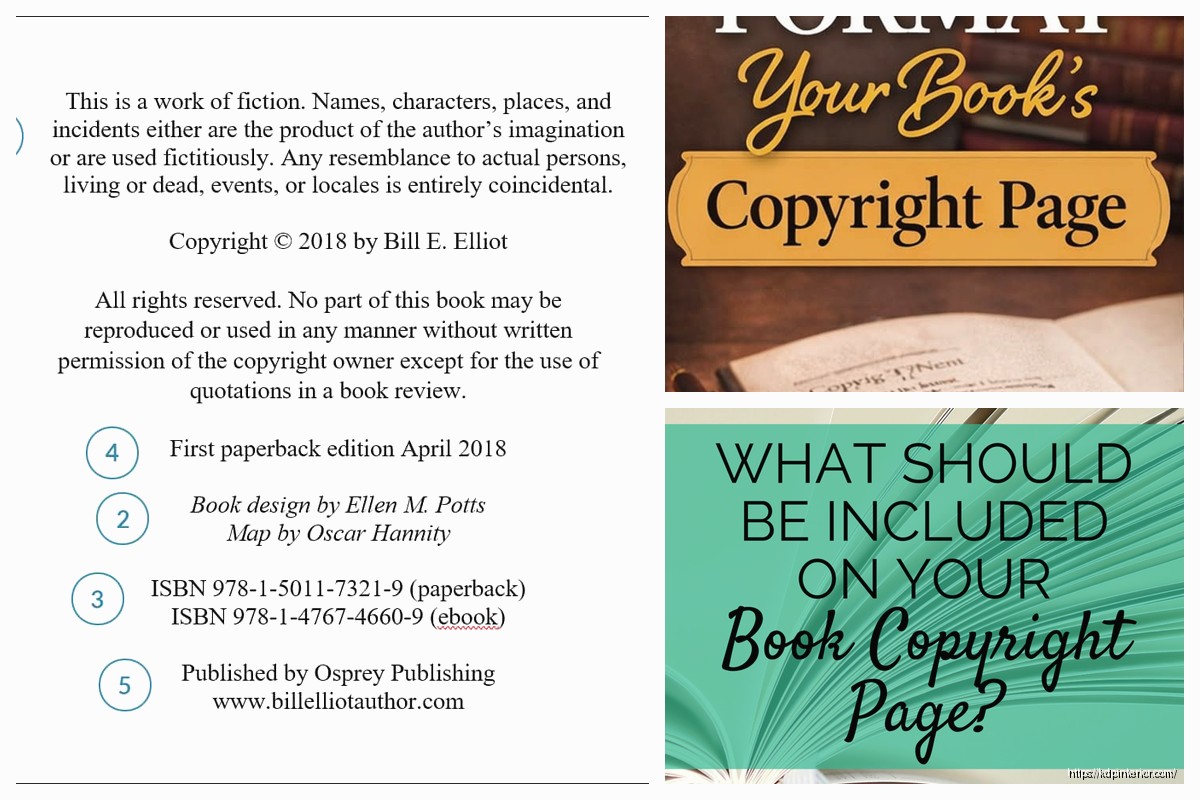
“This is a work of fiction. Names, characters, places, and incidents either are the product of the author’s imagination or are used fictitiously. Any resemblance to actual persons, living or dead, events, or locales is entirely coincidental.”
For nonfiction, especially anything instructional or advice-based, you need stronger language:
“The information provided in this book is for educational purposes only. The author and publisher are not liable for any damages or negative consequences from any treatment, action, or application of information in this book.”
I publish a lot of planners and low-content books, and even those I include a basic disclaimer. Better safe than sorry, legal stuff is expensive to deal with later.
You wanna note which edition this is. First edition books just say “First Edition” or “First Printing, 2024” – if you make significant updates later, you’d change it to “Second Edition” etc.
Some people get really detailed with printing numbers (you know, that “10 9 8 7 6 5 4 3 2 1” thing) but honestly for KDP print-on-demand that’s kinda overkill. Nobody’s tracking printing runs when each book is literally printed when someone orders it.
If you used editors, cover designers, formatters, whatever – credit them here. This isn’t legally required but it’s professional and people appreciate it.
Cover design by Jane Smith
Edited by Bob Johnson
For my books I always credit my cover designer because she’s awesome and deserves the recognition. Plus if someone likes your cover they might hire her too, good karma and all that.
Include your author website or a way for readers to contact you. Could be:
www.yourauthorwebsite.com
Or an email specifically for your author business. I use a separate email for my author stuff, keeps it organized. Some people link their social media but I prefer keeping the copyright page simple, save the social links for the back matter of the book.
Wait I forgot to mention – you don’t need to register your copyright with the US Copyright Office before publishing. Your work is automatically copyrighted the moment you create it. Registration gives you additional legal benefits if you ever have to sue someone, but for most KDP authors it’s not necessary upfront.
I’ve published over 200 books and only registered like 3 of them with the copyright office, the ones that were my biggest sellers and I was extra protective of. Costs $65 per registration so it adds up fast.
You also don’t need a lawyer to write your copyright page. All this standard language is… well, standard. I’m not a lawyer obviously but I’ve used these same templates for years without issues. If you’re doing something really unique or potentially controversial, maybe consult one, but for regular books you’re fine with standard language.
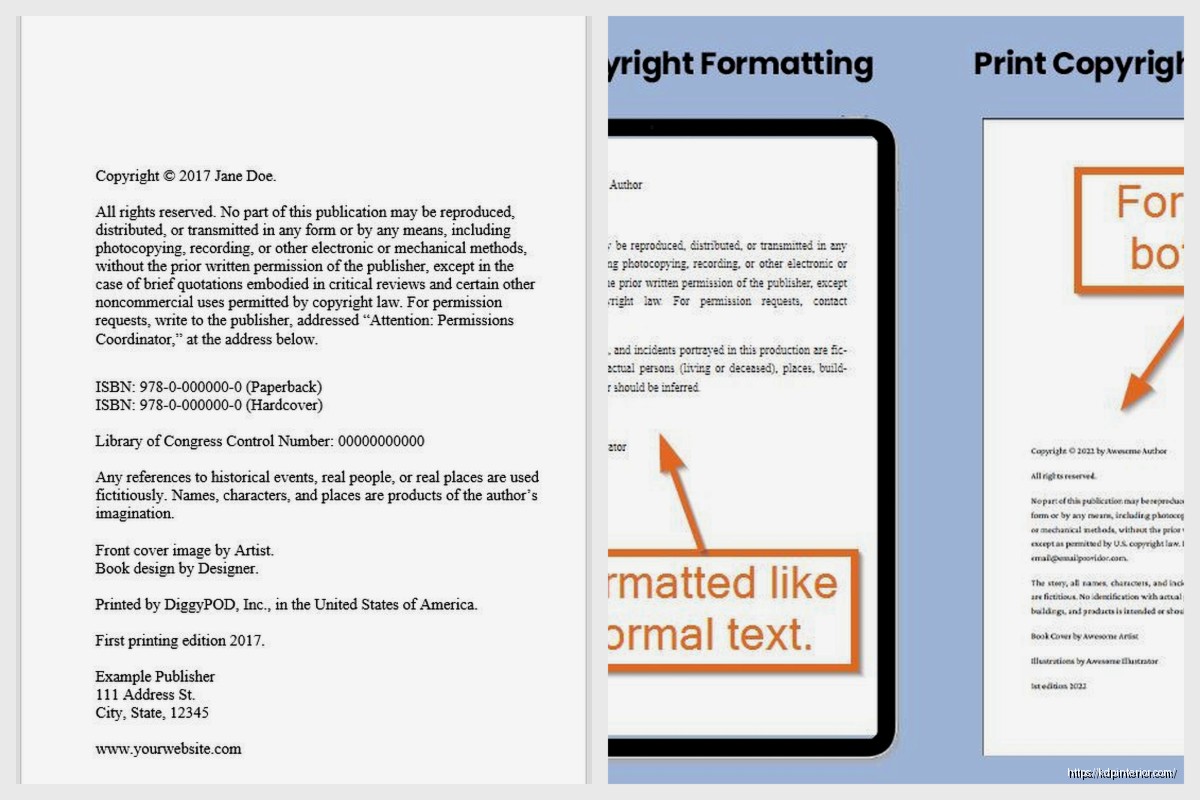
Okay so putting it all together, here’s basically what mine look like:
Copyright © 2024 Daniel Harper
All rights reserved. No part of this book may be reproduced in any form or by any electronic or mechanical means, including information storage and retrieval systems, without written permission from the author, except for the use of brief quotations in a book review.
Published by Harper Digital Press
Seattle, Washington
This is a work of fiction. Names, characters, places, and incidents either are the product of the author’s imagination or are used fictitiously.
ISBN: 978-1-234567-89-0
First Edition
Cover design by [Designer Name]
www.danielharperbooks.com
Clean, simple, covers all the legal bases. The whole thing fits on one page which is standard.
Keep the copyright page as page 1 or 2 of your book interior. Usually it goes right after the title page. In ebooks, Amazon’s Look Inside feature shows this page so make sure it looks professional.
Use a smaller font size than your main text – I usually go 10pt or 11pt when my body text is 12pt. Centers everything or left-aligns, either works but be consistent.
Don’t get fancy with this page. No colors, no images (well, unless you wanna add your publisher logo but keep it small), just black text on white. My cat literally walked across my keyboard once while I was formatting a copyright page and I almost left in the gibberish because I was so tired, but yeah, keep it clean and simple.
If you’re publishing public domain works with your own introduction or annotations, your copyright only covers YOUR additions, not the original text. Your copyright page needs to make that clear:
“Introduction and notes copyright © 2024 Daniel Harper. Original text is in the public domain.”
For translations, credit the translator and note which edition you translated from. For compilations or anthologies, if you’re including other people’s work with permission, you need to note their copyrights too.
Box sets are interesting – technically each book in the set has its own copyright, but you can create a compilation copyright for the set as a whole. I usually list each book’s original copyright year then add a line about the collection.
When you upload a new version to KDP, you don’t necessarily need to change the copyright year unless it’s been like 5+ years or you’ve significantly rewritten the book. Minor corrections and typo fixes don’t require updating the copyright info.
I’ve got books from 2017 still showing Copyright 2017 even though I’ve updated the files a few times. That’s fine, it shows the original publication date.
One thing though – if you add major new content, like expanding a 20k word book to 40k words, then yeah, add a note: “Revised and expanded edition, 2024” or update to Second Edition with the new year.
Amazon KDP is pretty relaxed about copyright pages for ebooks, they mostly care that you have something there. Print books they check more carefully during the review process. I’ve had print books kicked back before for missing ISBN info on the copyright page even though it was on the back cover.
IngramSpark and Draft2Digital have similar requirements but IngramSpark is pickier about formatting. They want everything perfect or they’ll reject your file, learned that the hard way on my first upload there.
If you’re going to libraries through like OverDrive or Hoopla, they sometimes want additional information about digital rights management and lending terms, but that’s more advanced stuff most people don’t worry about starting out.
Oh and another thing – international copyright is handled through treaties so your US copyright is recognized in most countries automatically. You don’t need separate copyright pages for different markets, one works globally. Though if you’re translating to other languages obviously translate the copyright page too.
The main thing is just having something there that covers the basics. I spent way too much time overthinking this stuff early on when I should’ve been writing more books. Get a template that works, use it consistently, and move on to the actual content that matters. Nobody’s buying your book because of the copyright page, but you gotta have one that’s legally solid so you’re protected.
DISCOVER OUR FREE BEST SELLING PRODUCTS
Editable Canva Lined Journal: Express Your Thoughts – KDP Template
Lined Pages Journal 120 pages Ready to Upload PDF Commercial Use KDP Template 6×9 8.5×11 5×8 for Notebooks, Diaries, Low Content
Lined Pages Journal 120 pages Ready to Upload PDF Commercial Use KDP Template 6×9 8.5×11 5×8 for Notebooks, Diaries, Low Content
Cute Dogs Coloring Book for Kids | Activity Book | KDP Ready-To-Upload
Daily Planner Diary : Diary Planners for Everyday Productivity, 120 pages, 6×9 Size | Amazon KDP Interior
Wolf Coloring KDP interior For Adults, Used as Low Content Book, PDF Template Ready To Upload COMMERCIAL Use 8.5×11"
Coloring Animals Head Book for Kids, Perfect for ages 2-4, 4-8 | 8.5×11 PDF
Printable Blank Comic Book Pages PDF : Create Your Own Comics – 3 Available Sizes
Notes KDP interior Ready To Upload, Sizes 8.5×11 6×9 5×8 inch PDF FILE Used as Amazon KDP Paperback Low Content Book, journal, Notebook, Planner, COMMERCIAL Use
Black Lined Journal: 120 Pages of Black Lined Paper Perfect for Journaling, KDP Notebook Template – 6×9
Student Planner Journal 120 pages Ready to Upload PDF Commercial Use KDP Template 6×9" 8.5×11" for Low Content book
Recipe Journal Template – Editable Recipe Book Template, 120 Pages – Amazon KDP Interior