
-
×
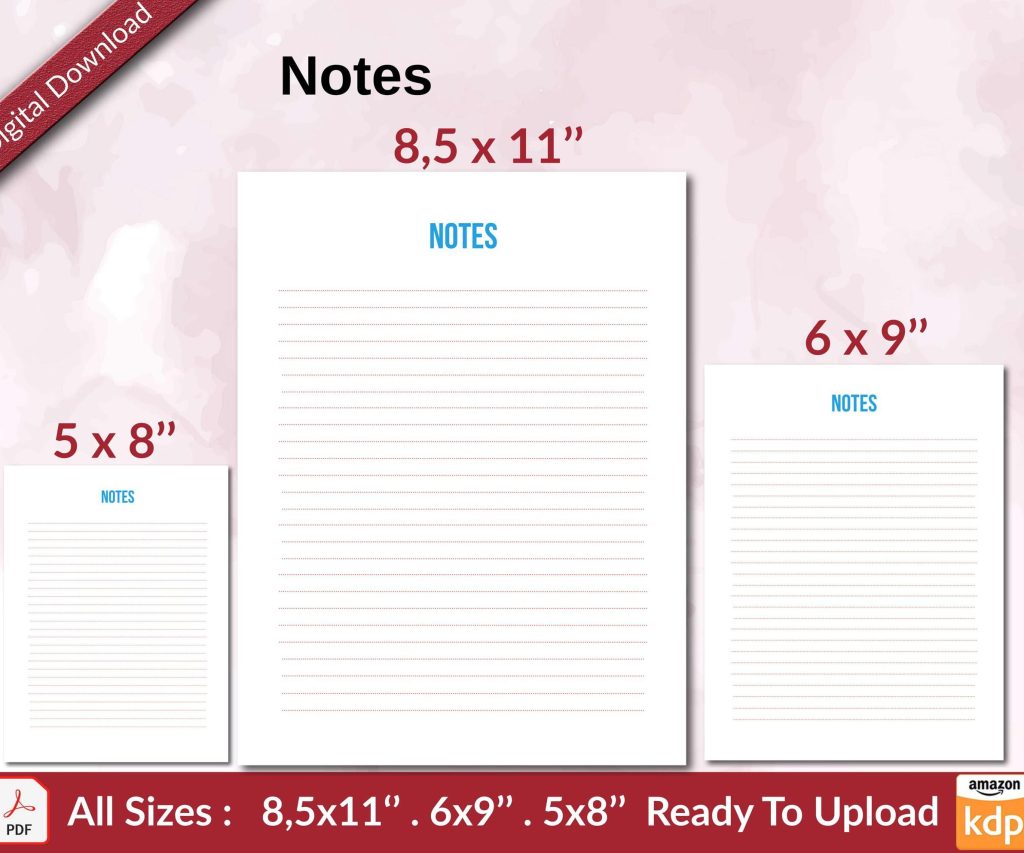 Notes KDP interior Ready To Upload, Sizes 8.5x11 6x9 5x8 inch PDF FILE Used as Amazon KDP Paperback Low Content Book, journal, Notebook, Planner, COMMERCIAL Use
1 × $0.00
Notes KDP interior Ready To Upload, Sizes 8.5x11 6x9 5x8 inch PDF FILE Used as Amazon KDP Paperback Low Content Book, journal, Notebook, Planner, COMMERCIAL Use
1 × $0.00
Subtotal: $0.00
Okay so the whole KDP formatting thing used to drive me absolutely crazy until I figured out their actual specs aren’t that complicated, you just gotta know where they’re flexible and where they’re not.
First thing – your trim size dictates literally everything else. I’ve been using 6×9 for most of my books because it’s the sweet spot for production costs and looks professional for non-fiction. But here’s the thing… if you’re doing a workbook or journal, 8.5×11 gives you way more room for activities and people actually prefer the larger format for those. I tested this last month with two identical gratitude journals and the 8.5×11 outsold the 6×9 by like 40%.
The most common trim sizes that won’t mess up your margins:
Don’t get creative with custom sizes unless you absolutely have to. KDP charges more for non-standard dimensions and it’s rarely worth it.
So margins… this is where I see people fail their first upload like 90% of the time. KDP has minimum margin requirements based on page count, and if you don’t account for the gutter (inside margin), your text is gonna disappear into the binding.
For a 6×9 book:
I personally use 0.5 inch on all sides for books under 150 pages, then 0.75 on the inside for anything bigger. Yeah it’s more than the minimum but I’ve had customers complain about tight bindings before and it’s not worth the one-star reviews.
Oh and another thing – if you’re doing a paperback, always check “mirror margins” in Word or whatever program you’re using. Left and right pages need opposite margins so the gutter alternates. I forgot this on my third book ever and had to reupload like four times before I figured out why it looked weird.
Wait I forgot to mention bleed. If you have any images, borders, or background colors that extend to the edge of the page, you need bleed. KDP wants 0.125 inches (that’s exactly 0.125, not rounded) of extra content beyond your trim size on all sides.
So for a 6×9 book with bleed, your actual document size needs to be 6.25×9.25 inches. Then you set your margins from the trim line, not the bleed edge. This is super important for coloring books or any low-content book with design elements.
Most of my books don’t use bleed because it’s just text, but when I do journals with decorative page borders, I always create the doc at the larger size first. Easier than trying to add bleed later.
Fonts are… okay so this is gonna sound weird but most people overthink this. For body text, you basically want serif fonts. Garamond, Georgia, Baskerville, Caslon – these all work great. I use Garamond at 11pt for most of my books and it’s perfectly readable.
Sans-serif fonts like Arial or Calibri can work for headers and modern non-fiction, but they look kinda cheap for body text in my opinion. I tested this with beta readers and they consistently rated serif fonts as more “professional looking.”
Size-wise:
Line spacing should be 1.15 to 1.5 for body text. Single spacing looks cramped, double spacing wastes too much paper (higher printing costs). I use 1.25 for most books.
First line indent should be 0.3 to 0.5 inches. Don’t use tab key – set it in your paragraph styles. And here’s something I learned the hard way: don’t indent the first paragraph after a chapter title or section break. That’s standard publishing convention and when you break it, people notice even if they can’t articulate why it looks wrong.
Space between paragraphs – either use first-line indent OR space between, not both. I see self-published books do both all the time and it looks super amateurish. Pick one system and stick with it throughout the entire book.
Page numbers usually go in the footer, either centered or outside corners (left on left pages, right on right pages). Don’t number the front matter the same way as the body – use Roman numerals (i, ii, iii) for front matter if you’re gonna number it at all.
A lot of people skip page numbers on:
Headers can have the book title on left pages and chapter title on right pages, or just the book title on both. Keep the font size around 9-10pt and use a different style than body text (maybe italic or small caps).
My cat just knocked over my coffee while I’m writing this but anyway…
Always start new chapters on odd-numbered (right-hand) pages. If your previous chapter ends on an odd page, insert a blank even page. This is standard book formatting and KDP’s preview will show you if you messed it up.
For the first page of each chapter:
Section breaks within chapters can be shown with extra line space, a decorative symbol (like * * *), or a small ornamental divider. Don’t just leave ambiguous white space – readers need to know if it’s intentional or a formatting error.
The order matters more than most people realize. Standard sequence:
I usually skip the half-title page on shorter books to save costs, but for anything over 150 pages it adds a nice professional touch.
Copyright page needs your actual copyright year, “All rights reserved” statement, and ISBN if you’re using one. I also put my edition number and a disclaimer that it’s published via Amazon KDP. Some people say not to mention KDP but I’ve never had an issue with it.
This is where I save myself hours every single book. I have master templates set up in Word for each trim size I use regularly. All the margins are correct, styles are pre-configured, headers and footers are set up with proper odd/even pages.
When I start a new book, I just open the template, save it as a new file, and start writing or paste in my content. The formatting is already done.
To create a template in Word:
Then every new book using that trim size starts with consistent formatting. I’ve got templates for 6×9 books, 8.5×11 workbooks, and 8×10 coloring books.
Use styles, seriously. Don’t manually format every heading by selecting text and clicking bold and changing font size. Create a “Heading 1” style, “Heading 2” style, etc. Then when you need to change something globally, you change the style once and it updates everywhere.
I didn’t do this for my first like 30 books and making consistent edits was a nightmare. Now I can adjust the font or spacing for all chapter titles in literally 10 seconds.
If you’re including images (probably not for novels but definitely for non-fiction, workbooks, kids books), they need to be at least 300 DPI at final print size. That’s non-negotiable for decent print quality.
Wrap text around images or keep them as standalone elements with caption text underneath. I usually center images and give them 0.1-0.2 inch spacing above and below so they don’t crowd the text.
For coloring books, line thickness matters. Too thin (under 1pt) and they won’t print clearly. Too thick (over 4pt) and they look cartoonish. I stick with 2-2.5pt lines for most designs.
The “Also By This Author” page usually goes in the back matter, right after the end of the actual content. Some people put it in front matter but I think that’s weird – let them finish your book first before pitching others.
Author bio goes at the very end, last page. Keep it short, relevant to the book’s topic, and include how readers can find you (website, social media, email list). Don’t be overly salesy here, just conversational.
Oh and if you’re doing a series, putting “Book 1 of the [Series Name]” on the title page helps readers understand where they are. I started doing this after getting reviews asking if books needed to be read in order.
KDP accepts Word docs but I always upload PDFs because you have more control over exactly what gets printed. When exporting to PDF from Word:
The file size will probably be bigger than you expect, especially with images. That’s fine. A 200-page book with some graphics might be 15-30 MB and KDP handles that no problem.
Before uploading, open your PDF in Adobe Reader (not Chrome or browser PDF viewer) and page through the whole thing. Check that:
I caught so many small errors this way that would’ve made it to print otherwise.
After uploading, KDP shows you a digital previewer and you can also download a PDF proof. Do both. The digital previewer sometimes shows issues that look fine in your original PDF, especially around margins near the binding.
I always order a physical proof copy before going live. It costs like $4-5 plus shipping but you’ll catch things that don’t show up digitally. The paper quality, how the binding looks, whether the cover wraps correctly – you can’t really judge this from screen.
Last week I caught that my page numbers were too close to the edge on a proof copy and had to reupload. Would’ve gotten complaints if I’d just published without checking.
Anyway that’s basically the core stuff for interior formatting. Once you’ve got a solid template and understand the margin requirements, it becomes pretty routine. Most of my books now take maybe 30 minutes to format properly because I’m just plugging content into proven templates.
DISCOVER OUR FREE BEST SELLING PRODUCTS
Editable Canva Lined Journal: Express Your Thoughts – KDP Template
Lined Pages Journal 120 pages Ready to Upload PDF Commercial Use KDP Template 6×9 8.5×11 5×8 for Notebooks, Diaries, Low Content
Lined Pages Journal 120 pages Ready to Upload PDF Commercial Use KDP Template 6×9 8.5×11 5×8 for Notebooks, Diaries, Low Content
Cute Dogs Coloring Book for Kids | Activity Book | KDP Ready-To-Upload
Daily Planner Diary : Diary Planners for Everyday Productivity, 120 pages, 6×9 Size | Amazon KDP Interior
Wolf Coloring KDP interior For Adults, Used as Low Content Book, PDF Template Ready To Upload COMMERCIAL Use 8.5×11"
Coloring Animals Head Book for Kids, Perfect for ages 2-4, 4-8 | 8.5×11 PDF
Printable Blank Comic Book Pages PDF : Create Your Own Comics – 3 Available Sizes
Notes KDP interior Ready To Upload, Sizes 8.5×11 6×9 5×8 inch PDF FILE Used as Amazon KDP Paperback Low Content Book, journal, Notebook, Planner, COMMERCIAL Use
Black Lined Journal: 120 Pages of Black Lined Paper Perfect for Journaling, KDP Notebook Template – 6×9
Student Planner Journal 120 pages Ready to Upload PDF Commercial Use KDP Template 6×9" 8.5×11" for Low Content book
Recipe Journal Template – Editable Recipe Book Template, 120 Pages – Amazon KDP Interior