Okay so template covers are honestly one of those things I wish someone had explained to me properly back in 2017 because I wasted like three months trying to design everything from scratch when there were perfectly good options sitting right there.
So here’s the deal with KDP template covers – you’ve basically got pre-made designs that you can customize with your own text, colors, sometimes images. The main places people grab these are Canva, Creative Fabrica, Etsy, and then there’s BookBolt which I’ll get to in a second because that one’s kinda different.
Canva Templates – The Obvious Starting Point
Most people start with Canva because it’s free-ish and the interface doesn’t make you want to throw your laptop out the window. They’ve got thousands of book cover templates already in there. You just search “book cover” and filter by the dimensions you need. For KDP you’re usually looking at 6×9 which means your cover needs to be like 6.25 x 9.25 to account for bleed.
The thing with Canva though – and this is gonna sound obvious but I see people mess this up constantly – you gotta make sure you’re actually downloading the right file type. KDP wants PDF or JPEG/PNG. I always do PDF because the quality stays consistent and you don’t have to worry about resolution issues as much.
Canva Pro is like $13/month or something and honestly if you’re serious about pumping out books it’s worth it just for the background remover and the premium templates. The free templates are fine but everyone and their mother uses them so your cover ends up looking like seventeen other books in your niche.
What Actually Works on Canva
The minimalist text-based templates work surprisingly well for low content books. Like if you’re doing planners or journals you don’t need some elaborate illustrated cover. I did a whole series of goal-setting journals last year with basically just nice typography and a solid color background. Made about $800 that quarter from that series alone.
But here’s where people screw up – they try to use the same template for every book and just change the title. Amazon’s algorithm can actually detect similar covers and it might hurt your visibility. I learned this the hard way when five of my gratitude journals got buried in search results because the covers were too similar.
Creative Fabrica and The Subscription Model
Creative Fabrica is this subscription service where you pay like $10-15/month and get access to basically unlimited graphics, fonts, templates, all that stuff. For book covers specifically they’ve got these PLR (private label rights) templates that you can fully customize and resell.
I signed up for this maybe two years ago? My cat literally walked across my keyboard and somehow completed the checkout process which is how I ended up with a subscription but whatever, turned out to be useful.
The quality is hit or miss though. Some creators on there are putting out gorgeous professional templates and others are… not. You gotta dig through a lot of mediocre stuff to find the gems. I usually filter by “most downloaded” or check the reviews before grabbing anything.
The License Thing You Gotta Watch
Oh and another thing – always read the license terms. Most Creative Fabrica stuff is cool for commercial use but some templates have restrictions like you can’t use them for print-on-demand or you can only use them for X number of products. It’s buried in the fine print and honestly most people probably ignore it but technically you could get in trouble if the creator decides to enforce their terms.
Etsy Templates – Hit or Miss Quality
Etsy has a ton of sellers offering pre-made KDP cover templates. You buy them for like $5-20, download a Canva link or PowerPoint file or whatever format they’re using, and customize it yourself.
The advantage here is these are usually less common than the standard Canva templates since you’re paying for them. The disadvantage is quality control is all over the place. I’ve bought templates that were absolutely perfect and I’ve bought ones where the layers were all messed up or the dimensions were wrong or the fonts weren’t embedded properly.
There’s this one seller – I’m not gonna name them because I don’t wanna sound like I’m promoting anyone specific – but they do these really clean modern templates for planners and I’ve probably bought like 30 templates from them over the past year. They’re consistent, the files are organized, dimensions are always correct. That’s what you want.
What to Look For When Buying
Check the reviews obviously but also look at how many sales they’ve made. If a template has 500+ sales and mostly five-star reviews it’s probably solid. Also check if they offer support – some sellers will help you troubleshoot if something’s not working right.
And make sure they’re giving you an editable format. Some sellers try to sell you just a JPEG which is useless because you can’t customize it properly. You want Canva templates, PowerPoint, Photoshop files, something you can actually edit.
BookBolt – The All-in-One Thing
Okay so BookBolt is different because it’s not just templates, it’s like a whole research and design tool for KDP publishers. They’ve got cover templates built in but also interior templates, keyword research tools, all that stuff. It’s pricey though – like $10-30/month depending on which plan you get.
I use BookBolt mostly for research and interiors but their cover creator is actually pretty decent. The templates are organized by niche which is helpful when you’re trying to figure out what’s working in your category. You can see “oh, minimalist text covers are popular for productivity planners right now” or whatever.
The drag-and-drop editor is easier than Photoshop but not as flexible as Canva honestly. It’s good if you want something quick and you’re not too picky about having total creative control.
The DIY Route – PowerPoint and Google Slides
This is gonna sound weird but some people make entire book covers in PowerPoint or Google Slides. I did this for my first like 20 books because I didn’t know better options existed. It actually works fine for simple text-based covers.
You set up your slide dimensions to match your book size plus bleed, add your text and graphics, export as PDF. Done. Is it the most professional approach? No. Does it work? Yeah, actually.
There are templates on Etsy and Creative Fabrica specifically made for PowerPoint which is wild to me but whatever works I guess.
Stock Photo Sites with Templates
Creative Market and Design Bundles have book cover templates too. These tend to be more expensive – like $15-50 per template – but they’re usually higher quality professional designs. If you’re doing higher content books or you really want your covers to stand out this might be worth it.
I bought a bundle of 50 cover templates from Creative Market last Black Friday for like $29 which was a steal. Used about 15 of them so far. The rest are just sitting in my downloads folder waiting for the right project.
Font Pairing is Harder Than It Looks
Wait I forgot to mention – one of the biggest issues with DIY template covers is font pairing. People pick fonts that clash or use too many different fonts on one cover. If you’re not sure what fonts work together, stick with the fonts that come with the template. The designer already did the hard work of pairing them properly.
Or use a font pairing guide. There’s free ones online that show you which fonts complement each other. I keep a list of like 10 font combinations that I know work well and I just rotate through those.
Free vs Paid – Is It Worth Paying?
I get asked this all the time. My honest answer is it depends on your volume. If you’re publishing one book every few months, free Canva templates are probably fine. If you’re publishing multiple books per month like I do, paying for premium templates saves you so much time and your covers look more unique.
I probably spend like $50/month total on templates, fonts, graphics, all that stuff. But I’m also publishing 6-8 books per month so it works out to like $6-8 per book which is nothing compared to hiring a designer at $50-200 per cover.
Customization is Key
Here’s the thing nobody tells you – just downloading a template and changing the title isn’t enough. You gotta customize colors, swap out graphics, maybe adjust the layout a bit. Make it yours. I see so many books on Amazon with identical covers because people just used the template as-is.
Change the color scheme to match your niche. If you’re doing a productivity planner and the template is bright pink but productivity planners in your niche are usually navy and gold, switch it up. Look at the bestsellers in your category and match the vibe without copying directly.
The Amazon Preview Thing
Oh and test your cover in Amazon’s preview tool before you publish. Sometimes colors look different on screen vs how they show up in the Amazon thumbnail. I had this whole batch of covers that looked great on my computer but the thumbnails were so dark you couldn’t read the title. Had to go back and lighten everything up.
The thumbnail is honestly more important than the full-size cover because that’s what people see when they’re browsing. Your title needs to be readable at like 120 pixels wide. Test it by shrinking your cover down in your design program and seeing if you can still read it.
Organizing Your Template Library
This is probably boring but it’s actually important – organize your templates in a folder system that makes sense. I’ve got folders for different niches (planners, journals, coloring books, etc.) and subfolders for different styles (minimalist, floral, modern, vintage, whatever).
When I need a cover I can just go to the right folder instead of scrolling through hundreds of random files. Saves me probably an hour a week just having things organized properly. I learned this after spending 45 minutes looking for a template I knew I had downloaded but couldn’t find anywhere.
Trends Change Faster Than You Think
One more thing – cover trends in different niches change pretty fast. What worked for planners in 2023 might look dated in 2024. I try to update my covers every 12-18 months for books that are selling well. You don’t have to completely redesign, just freshen them up a bit.
Floral covers were huge for journals a couple years ago, now everyone’s doing minimalist geometric designs. Then it’ll probably swing back to something else. Just keep an eye on what’s topping the charts in your niche and adjust accordingly.
Anyway that’s basically everything I know about KDP template covers. It’s not complicated once you figure out where to find good templates and how to customize them properly. Start with free Canva stuff, upgrade to paid templates when you’re publishing consistently, and always always test your covers at thumbnail size before you publish.

 Daily Planner Diary : Diary Planners for Everyday Productivity, 120 pages, 6×9 Size | Amazon KDP Interior
1 × $0.00
Daily Planner Diary : Diary Planners for Everyday Productivity, 120 pages, 6×9 Size | Amazon KDP Interior
1 × $0.00 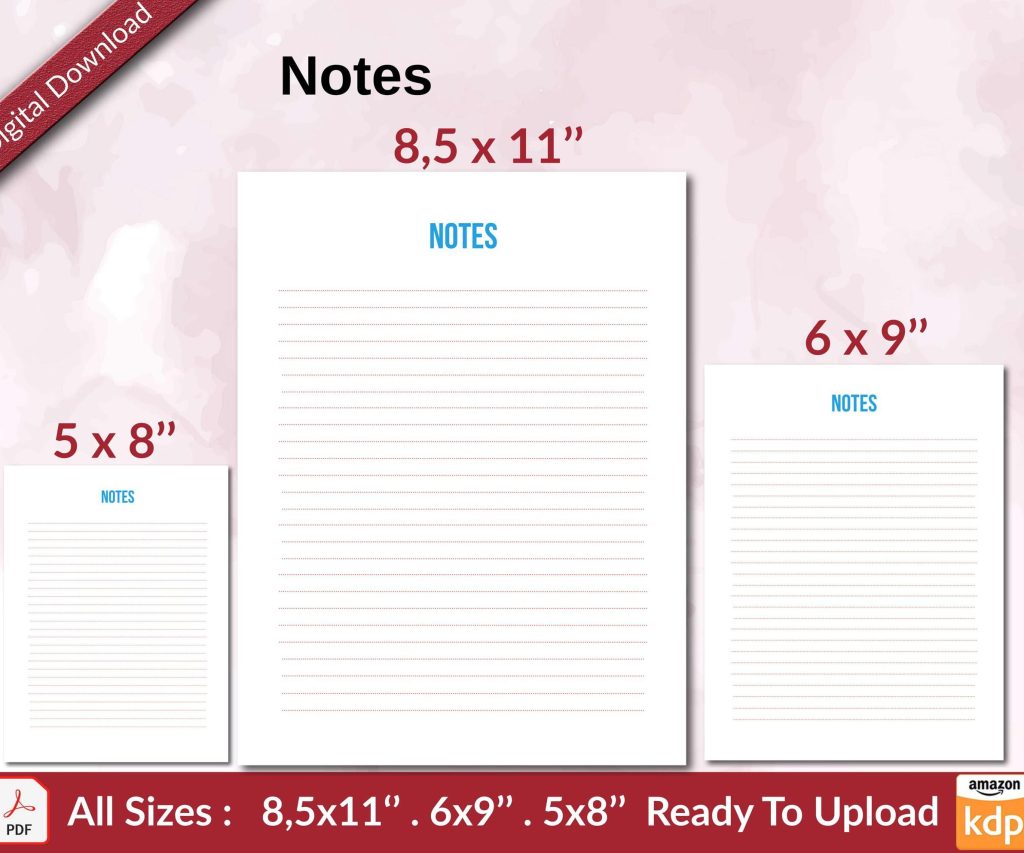 Notes KDP interior Ready To Upload, Sizes 8.5x11 6x9 5x8 inch PDF FILE Used as Amazon KDP Paperback Low Content Book, journal, Notebook, Planner, COMMERCIAL Use
1 × $0.00
Notes KDP interior Ready To Upload, Sizes 8.5x11 6x9 5x8 inch PDF FILE Used as Amazon KDP Paperback Low Content Book, journal, Notebook, Planner, COMMERCIAL Use
1 × $0.00 
DISCOVER OUR FREE BEST SELLING PRODUCTS
Editable Canva Lined Journal: Express Your Thoughts – KDP Template
Lined Pages Journal 120 pages Ready to Upload PDF Commercial Use KDP Template 6×9 8.5×11 5×8 for Notebooks, Diaries, Low Content
Lined Pages Journal 120 pages Ready to Upload PDF Commercial Use KDP Template 6×9 8.5×11 5×8 for Notebooks, Diaries, Low Content
Cute Dogs Coloring Book for Kids | Activity Book | KDP Ready-To-Upload
Daily Planner Diary : Diary Planners for Everyday Productivity, 120 pages, 6×9 Size | Amazon KDP Interior
Wolf Coloring KDP interior For Adults, Used as Low Content Book, PDF Template Ready To Upload COMMERCIAL Use 8.5×11"
Coloring Animals Head Book for Kids, Perfect for ages 2-4, 4-8 | 8.5×11 PDF
Printable Blank Comic Book Pages PDF : Create Your Own Comics – 3 Available Sizes
Notes KDP interior Ready To Upload, Sizes 8.5×11 6×9 5×8 inch PDF FILE Used as Amazon KDP Paperback Low Content Book, journal, Notebook, Planner, COMMERCIAL Use
Black Lined Journal: 120 Pages of Black Lined Paper Perfect for Journaling, KDP Notebook Template – 6×9
Student Planner Journal 120 pages Ready to Upload PDF Commercial Use KDP Template 6×9" 8.5×11" for Low Content book
Recipe Journal Template – Editable Recipe Book Template, 120 Pages – Amazon KDP Interior