Okay so here’s the thing about publishing on Amazon – you can literally spend zero dollars or blow thousands, and I’ve done both ends of that spectrum so let me break down what actually matters.
The Completely Free Route (What Actually Works)
So if you’re starting with nothing, Amazon KDP itself is 100% free to use. Like you just sign up, no credit card needed, and you can upload your manuscript right now. I did this with my first three books back in 2017 because I was broke and stubborn.
The free tools you actually need are gonna be Google Docs for writing (or even just Word if you already have it), and honestly that’s pretty much it for the text part. For covers though – and this is where people mess up – you can use Canva’s free version. I know everyone says this but it’s true. Just don’t use their obvious templates that scream “I made this in Canva” because readers can tell.
Amazon’s cover creator tool exists but like… it’s rough. I used it once for a test book about meal planning and the cover looked like something from 2003. It technically works but you’re gonna have lower sales just from that alone.
Free Formatting Options
For formatting the interior, you’ve got a few options that don’t cost anything. Reedsy’s book editor is free and actually pretty solid – I used it for a coloring book description guide last month and it worked fine. Atticus has a free trial but then you gotta pay, so that doesn’t really count.
Here’s what I do for low-content books (journals, planners, that stuff): I just use PowerPoint or Google Slides. Sounds weird but you can set custom page sizes and export as PDF. Been doing this for years and nobody knows the difference.
Where Free Breaks Down
Okay so the problem with going completely free is your time investment becomes insane. Like I spent probably 40 hours learning to format my first book properly because I refused to pay anyone. That’s fine if you have time and no money, but if you value your time at even like $15/hour, you just spent $600 worth of time to save $50 on a formatter.
Also free cover design – unless you’re actually good at design – usually looks… not great. My first book cover I made myself got maybe 2 sales a month. Paid someone $45 on Fiverr for a redo and sales jumped to like 15-20 monthly. Same book, same keywords, just better cover.
The Marketing Problem
Oh and another thing – marketing costs money eventually if you want real results. You can post on social media for free all day but Amazon ads are where most of my sales come from now. That’s not a publishing cost technically but it’s part of the real picture.
Paid Options That Actually Matter
So when I finally started making money from KDP, I began investing back into the books. Here’s what I spend on now and what it costs:
Professional Covers: This ranges wildly. Fiverr designers run $20-$100 depending on experience. I use a guy who charges $65 per cover and he’s perfect for my niche stuff. PreMadeBookCovers.com has decent ones for $35-$80 if you don’t need custom. The expensive route is like $200-$500 for custom illustrated covers but that’s only worth it if you’re doing a series or know the book will sell.
I tried the expensive route once for a cookbook and honestly? The $65 covers sell just as well in my experience. Unless you’re going traditional-publishing-level quality, readers in most niches don’t care about that extra polish.
Formatting Services: For ebooks this is usually $30-$75. Paperback formatting runs $50-$150 depending on length and complexity. Low-content interiors are different – I pay $3-$8 per interior design on Creative Fabrica when I’m being lazy, or I make them myself in like 20 minutes once you know what you’re doing.
Wait I forgot to mention – if you’re doing actual novels or non-fiction with images and stuff, formatting gets pricier. I had a travel guide formatted once and it cost $120 because of all the photo placement stuff.
ISBNs (The Confusing Part)
Amazon gives you free ISBNs but they own them technically. For most people this is totally fine. I’ve published like 180 books with Amazon’s free ISBNs and never had an issue.
But if you want to publish the same book on like IngramSpark or other platforms, you need your own. In the US, one ISBN costs $125 from Bowker. Ten costs $295. It’s a scam honestly but that’s the official price.
I bought the 10-pack in 2019 and still have 3 left because turns out I don’t need them as much as I thought. Most of my books only go on Amazon anyway.
Editing Costs (Ugh)
This is gonna sound bad but for low-content books you don’t really need editing. Like a journal is just prompts and blank pages – what’s there to edit?
For actual books with words though… developmental editing runs $0.02-$0.05 per word usually. So a 50k word book costs $1,000-$2,500. Copy editing is cheaper at like $0.01-$0.03 per word. Proofreading is the cheapest at $0.008-$0.02 per word.
I’ll be honest – my first ebook about starting on KDP had zero professional editing and it sold fine. I just used Grammarly premium ($12/month) and had my wife read it. But I was terrified someone would trash it for typos. Luckily my niche is forgiving.
For fiction you really should get editing though. Fiction readers are brutal about typos and plot holes.
Software and Tools
Some people swear by Vellum for formatting – it’s $250 for ebooks and paperbacks together (Mac only though, which is annoying). I don’t use it because I’m cheap and PowerPoint works for my stuff, but everyone says it’s worth it if you publish a lot.
Atticus is the new hotness – $147 one-time payment and it does formatting plus helps with writing. I keep meaning to try it but haven’t yet because… if it ain’t broke? I dunno.
Publisher Rocket is $97 one-time for keyword research. I use it and it’s probably paid for itself 50x over in finding good niches. But you can also just manually search Amazon for free, it just takes forever.
Print Costs (The Hidden Thing)
Okay so this trips people up – Amazon doesn’t charge you to publish but they take printing costs out of your royalty. A 100-page black and white paperback costs about $2.50 to print. Color is way more – like $5+ for the same page count.
This matters because if you price your book at $7.99, Amazon takes their cut (40% for bookstores, plus the print cost), and you might only make $1.50 per sale. You gotta factor this into pricing.
I have a coloring book that’s 100 pages and costs $6.80 just to print because it’s color. So I price it at $16.99 to make decent royalties. Some niches can support that pricing, others can’t.
Proof Copies
Oh and you should order proof copies before going live with paperbacks – they’re sold at cost so you just pay printing + shipping. Usually runs me about $8-12 per book depending on size. I always order at least one because I’ve caught formatting issues that looked fine on the computer but weird in print.
My cat knocked over my coffee on a proof copy once and I had to order another one, which was annoying but better than publishing with messed up margins.
The Hybrid Approach (What I Actually Do Now)
These days I spend money on covers and sometimes interiors, but I do my own formatting and writing. Like I’ll drop $65 on a good cover but format the ebook myself in 30 minutes using Reedsy.
For low-content stuff I buy interiors from Creative Fabrica ($8/month subscription gets you unlimited downloads) and then customize them slightly so they’re not identical to other people’s books. Takes maybe an hour per book total.
The math works out where I spend about $70-100 per book to publish now, and most of my books make that back within 2-3 months. The ones that don’t… well that’s the gamble right?
When to Spend vs Save
Okay so here’s my actual advice after doing this since 2017 – start free on your first book just to learn the process. Like literally spend zero dollars. It’ll probably not sell great but you’ll understand how KDP works.
Second book, invest in a decent cover at least. Maybe $40-50. See if better presentation helps sales.
Once you’re making consistent sales – like $100+ monthly from a few books – then start investing more. Better covers, maybe some ads, tools like Publisher Rocket.
Don’t spend thousands until you know what sells in your niche. I see people drop $2,000 on their first book with professional everything and it makes $43 total because they picked a dead niche.
Hidden Costs Nobody Mentions
Tax stuff – you might need an LLC eventually ($100-$300 depending on state). I set mine up after my first $10k year because the tax benefits made sense.
Stock photos if you need them – most sites charge $10-50 per image. Unsplash and Pexels are free but limited selection.
Software subscriptions add up – Grammarly, Canva Pro, Creative Fabrica, Publisher Rocket… I probably spend $50/month on various tools now. You don’t need them all starting out though.
Your time is the biggest cost honestly. Even if you’re not paying cash, you’re spending hours. Just be realistic about that.
What I’d Do Starting Over Today
If I started from zero right now knowing what I know, I’d probably spend about $100 on the first book. $50-65 on a cover from my Fiverr guy, $30-40 on a formatted interior if it’s low-content, and $10 on a proof copy.
Then I’d publish like 5-10 books in the same niche with that same budget per book, see what sticks, and scale up the winners with ads and better versions.
The totally free route works but it’s slow. The $5,000 first book route is usually wasteful unless you really know what you’re doing.
Most of my profitable books cost $50-150 to produce. The ones where I spent more didn’t necessarily sell better – the niche and keywords matter way more than production quality up to a certain baseline.
Oh wait I should mention – if you’re doing Kindle Unlimited you get paid by pages read too, not just sales. That’s free to enroll in and can double your income depending on the niche. Just means your book is exclusive to Amazon.
Anyway that’s the real breakdown. You can publish for free but expect to invest time instead of money. Or spend $50-100 per book and save yourself weeks of learning curves. Both work, just depends on what you’ve got more of.

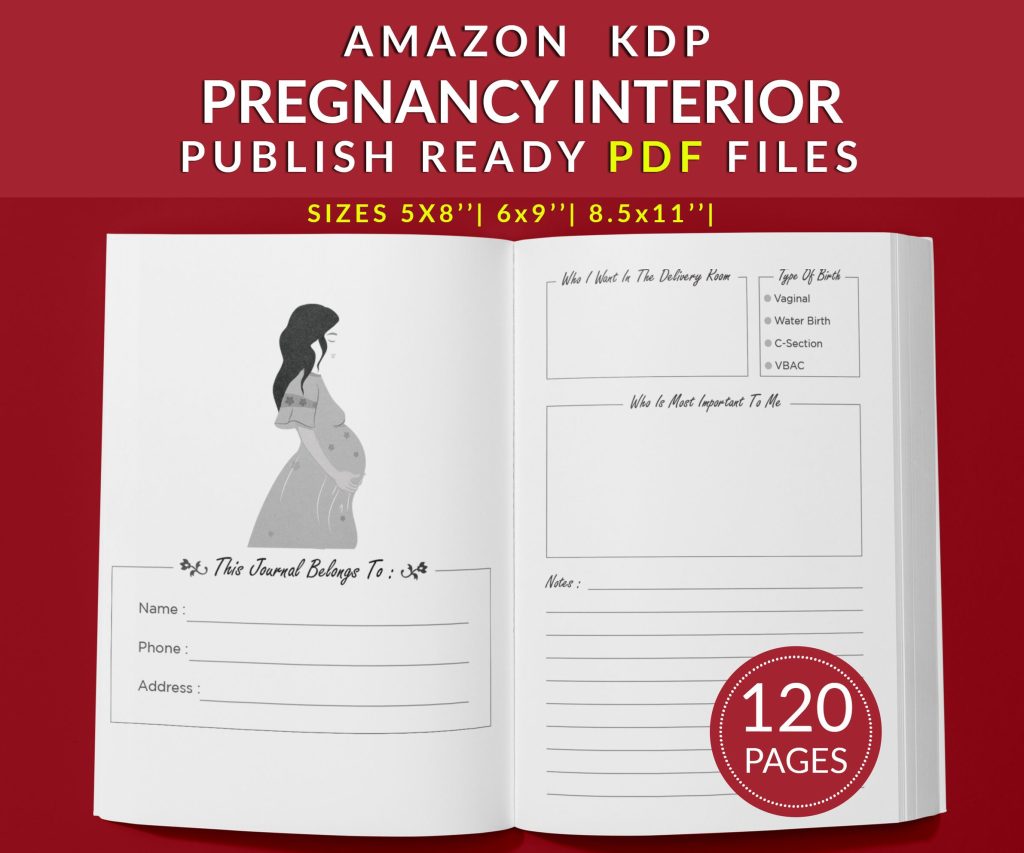 Pregnancy Journal 120 pages Ready to Upload PDF Commercial use Low Content Planner tracker or log Book KDP Template 6x9 8.5x11 5x8
1 × $2.90
Pregnancy Journal 120 pages Ready to Upload PDF Commercial use Low Content Planner tracker or log Book KDP Template 6x9 8.5x11 5x8
1 × $2.90  Cute Dogs Coloring Book for Kids | Activity Book | KDP Ready-To-Upload
1 × $0.00
Cute Dogs Coloring Book for Kids | Activity Book | KDP Ready-To-Upload
1 × $0.00 
DISCOVER OUR FREE BEST SELLING PRODUCTS
Editable Canva Lined Journal: Express Your Thoughts – KDP Template
Lined Pages Journal 120 pages Ready to Upload PDF Commercial Use KDP Template 6×9 8.5×11 5×8 for Notebooks, Diaries, Low Content
Lined Pages Journal 120 pages Ready to Upload PDF Commercial Use KDP Template 6×9 8.5×11 5×8 for Notebooks, Diaries, Low Content
Cute Dogs Coloring Book for Kids | Activity Book | KDP Ready-To-Upload
Daily Planner Diary : Diary Planners for Everyday Productivity, 120 pages, 6×9 Size | Amazon KDP Interior
Wolf Coloring KDP interior For Adults, Used as Low Content Book, PDF Template Ready To Upload COMMERCIAL Use 8.5×11"
Coloring Animals Head Book for Kids, Perfect for ages 2-4, 4-8 | 8.5×11 PDF
Printable Blank Comic Book Pages PDF : Create Your Own Comics – 3 Available Sizes
Notes KDP interior Ready To Upload, Sizes 8.5×11 6×9 5×8 inch PDF FILE Used as Amazon KDP Paperback Low Content Book, journal, Notebook, Planner, COMMERCIAL Use
Black Lined Journal: 120 Pages of Black Lined Paper Perfect for Journaling, KDP Notebook Template – 6×9
Student Planner Journal 120 pages Ready to Upload PDF Commercial Use KDP Template 6×9" 8.5×11" for Low Content book
Recipe Journal Template – Editable Recipe Book Template, 120 Pages – Amazon KDP Interior