okay so here’s what I figured out about publishing in multiple formats on Amazon
Look, I spent like three months testing this because one of my clients kept asking why their books weren’t selling and turns out they were only doing paperback. Big mistake. You gotta hit all three formats if you want to actually make money – ebook, paperback, and hardcover. Each one pulls different buyers and the algorithm actually rewards you for having multiple formats listed.
Start with the ebook first, always
So here’s the thing – always publish your ebook version first through KDP. Always. I learned this the hard way back in 2019 when I tried to launch a paperback first and it was a nightmare trying to link everything later. Amazon’s system wants to see the ebook as the parent listing, then you attach the other formats to it.
Upload your manuscript as either a DOC, DOCX, or EPUB file. I usually go with DOCX because it’s the most reliable. Make sure your formatting is clean – no weird tabs or spacing issues because Amazon’s converter will make it look even worse. For low content books this matters less but for actual ebooks with text, you’ll spend hours fixing conversion issues if you don’t prep it right.
The cover needs to be at least 1000 pixels on the shortest side but I always do 2560 x 1600 pixels. Better quality and it looks good on tablets. Save it as a JPEG, not PNG, because the file size gets too big otherwise.
Pricing strategy that actually works
Price your ebook between $2.99 and $9.99 to get the 70% royalty rate. Anything outside that range drops you to 35% which is garbage. I usually start at $4.99 for most of my books unless it’s something really niche, then I’ll go $6.99 or $7.99. You can always lower it later but raising prices after launch looks bad.
Oh and another thing – enroll in KDP Select if you’re just starting out. Yeah, it locks you into Amazon exclusively for 90 days but you get access to Kindle Unlimited reads which is where I make like 40% of my ebook income. Those page reads add up fast.
Adding paperback to your listing
After your ebook is live (takes like 24-72 hours usually), go back into your KDP dashboard and find the ebook listing. There should be a button that says something like “Create Paperback” or you can go to the paperback section and use the same title – Amazon will automatically ask if you want to link it to the existing ebook.
For paperback formatting, you need actual print-ready files. The interior has to be a PDF and the margins are different than ebook. I use 0.5″ margins on top and bottom, then 0.75″ on the outside edge and 0.875″ on the inside (that’s the binding edge). Amazon has templates you can download which honestly saves so much time.
Cover gets tricky because now you need a full wrap cover – front, spine, and back. Use Amazon’s Cover Calculator tool to get the exact dimensions based on your page count and paper type. The spine width changes depending on how many pages you have. I spent like two days once trying to figure out why my cover kept getting rejected and it was because I calculated the spine wrong for cream paper instead of white paper. They’re different thicknesses.
Hardcover is where you make the real profit margins
Okay so funny story – I ignored hardcover for like three years because I thought it was only for “real” authors or whatever. Then I published one as a test last year and it outsold my paperback version. People perceive hardcovers as more valuable and you can charge way more.
Same process as paperback – go to your ebook listing and add hardcover format. The formatting is basically identical to paperback but Amazon offers different sizes. I usually do 6″ x 9″ for most books because it’s a standard size and keeps printing costs reasonable.
Here’s where it gets good – paperback printing costs might be like $3.50 for a 150-page book, but hardcover is maybe $7.50. Sounds like a lot but you can price the hardcover at $24.99-$29.99 while your paperback is $12.99. Do the math and your profit per hardcover sale is actually higher even with the increased printing cost.
My dog just knocked over my coffee but whatever, moving on…
The linking thing that trips everyone up
Amazon is supposed to automatically link all your formats together so they show up on the same product page with a dropdown for “ebook, paperback, hardcover” but sometimes it doesn’t happen. I’ve had books take two weeks to link properly and nobody knows why.
If they don’t link automatically, you gotta contact KDP support. Use the contact form and give them all the ASINs (that’s Amazon’s product ID number) for each format. They’ll manually link them, usually takes 24-48 hours after you submit the request. Don’t skip this step because having separate listings kills your sales – customers don’t know the other formats exist.
Distribution and expanded distribution
For paperback and hardcover, you get an option for “Expanded Distribution” which puts your book in bookstores and libraries potentially. Sounds great but your royalty drops significantly. I only enable it for books I think might actually get picked up by libraries – like educational content or local interest stuff.
Most of my low content books I skip expanded distribution because the royalty cut isn’t worth it. You’re already making slim margins on a $6.99 notebook, you don’t need it dropping even more.
Different content strategies for different formats
Wait I forgot to mention – you can actually vary the content slightly between formats if you want. I’ve done this where the ebook version has bonus chapters or the hardcover has extra illustrations. Amazon’s fine with it as long as the core content is the same book.
Some of my clients do special “hardcover edition” versions with additional resources or a different cover design. Premium positioning or whatever. It works if you market it right but it’s more effort.
Launch sequence that maximizes visibility
Here’s what I do now after testing different approaches – publish the ebook first and run it for about a week. Get some reviews going, maybe run a small ad campaign. Then add the paperback and hardcover within a few days of each other.
This is gonna sound weird but Amazon’s algorithm seems to give you a little boost when you add new formats to an existing listing. I’ve seen sales jump for a couple days after adding paperback or hardcover. Could be coincidence but it’s happened enough times that I plan for it now.
The formats people actually buy
My sales breakdown across my 200+ books averages out to roughly 60% ebook, 30% paperback, 10% hardcover. But that varies wildly by genre and book type. My low content stuff is more like 20% ebook, 70% paperback, 10% hardcover because people want physical planners and journals.
Fiction and how-to books lean heavier toward ebook. Anything gift-related or decorative sells better in hardcover. You gotta know your market.
Updating and managing multiple formats
When you need to update content, you have to update each format separately. Yeah it’s annoying. I keep a master file for each format in a Dropbox folder so I can quickly make changes and reupload.
Amazon takes 3-5 days to review updates for paperback and hardcover, faster for ebook. Plan accordingly if you’re fixing errors or adding content.
One more thing – your book description and keywords can be the same across all formats since they share a listing page once linked. But your pricing strategy should definitely differ. Ebook cheapest, paperback middle, hardcover premium. That’s the structure buyers expect.

 Cute Dogs Coloring Book for Kids | Activity Book | KDP Ready-To-Upload
1 × $0.00
Cute Dogs Coloring Book for Kids | Activity Book | KDP Ready-To-Upload
1 × $0.00 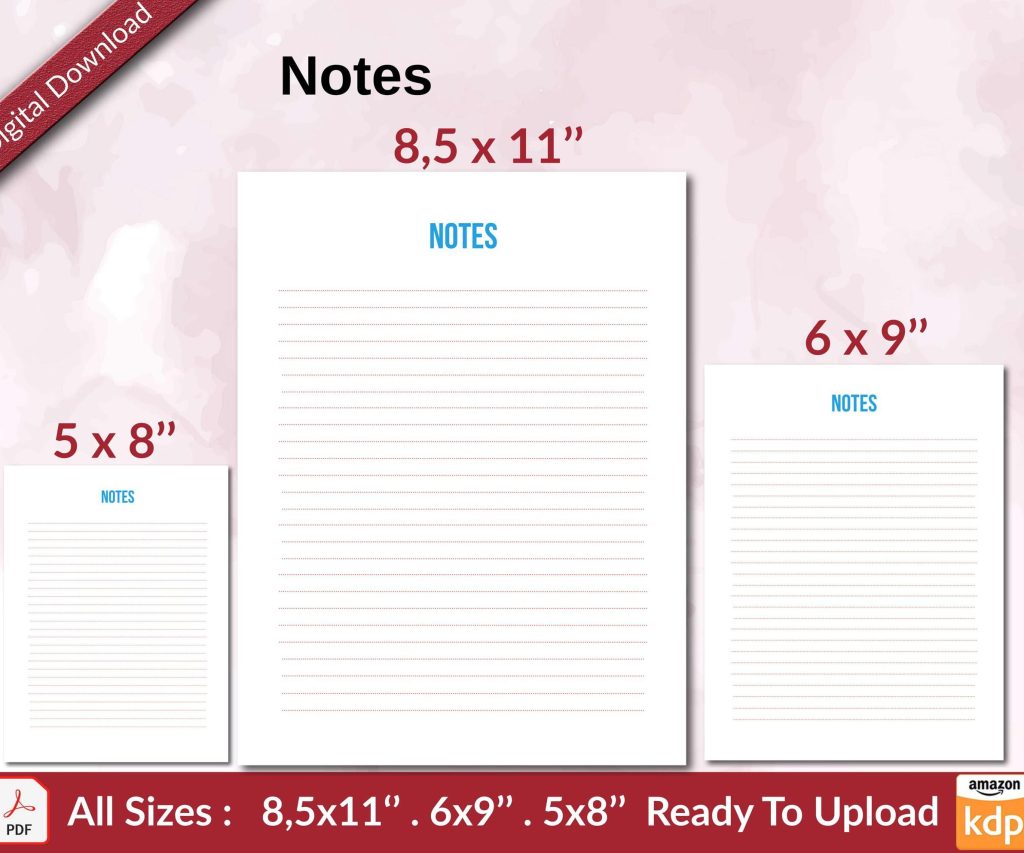 Notes KDP interior Ready To Upload, Sizes 8.5x11 6x9 5x8 inch PDF FILE Used as Amazon KDP Paperback Low Content Book, journal, Notebook, Planner, COMMERCIAL Use
1 × $0.00
Notes KDP interior Ready To Upload, Sizes 8.5x11 6x9 5x8 inch PDF FILE Used as Amazon KDP Paperback Low Content Book, journal, Notebook, Planner, COMMERCIAL Use
1 × $0.00 
DISCOVER OUR FREE BEST SELLING PRODUCTS
Editable Canva Lined Journal: Express Your Thoughts – KDP Template
Lined Pages Journal 120 pages Ready to Upload PDF Commercial Use KDP Template 6×9 8.5×11 5×8 for Notebooks, Diaries, Low Content
Lined Pages Journal 120 pages Ready to Upload PDF Commercial Use KDP Template 6×9 8.5×11 5×8 for Notebooks, Diaries, Low Content
Cute Dogs Coloring Book for Kids | Activity Book | KDP Ready-To-Upload
Daily Planner Diary : Diary Planners for Everyday Productivity, 120 pages, 6×9 Size | Amazon KDP Interior
Wolf Coloring KDP interior For Adults, Used as Low Content Book, PDF Template Ready To Upload COMMERCIAL Use 8.5×11"
Coloring Animals Head Book for Kids, Perfect for ages 2-4, 4-8 | 8.5×11 PDF
Printable Blank Comic Book Pages PDF : Create Your Own Comics – 3 Available Sizes
Notes KDP interior Ready To Upload, Sizes 8.5×11 6×9 5×8 inch PDF FILE Used as Amazon KDP Paperback Low Content Book, journal, Notebook, Planner, COMMERCIAL Use
Black Lined Journal: 120 Pages of Black Lined Paper Perfect for Journaling, KDP Notebook Template – 6×9
Student Planner Journal 120 pages Ready to Upload PDF Commercial Use KDP Template 6×9" 8.5×11" for Low Content book
Recipe Journal Template – Editable Recipe Book Template, 120 Pages – Amazon KDP Interior