okay so here’s what actually works with KDP passive income
Look, I’m gonna be straight with you because everyone makes this way more complicated than it needs to be. Started testing this back in 2017 and honestly the first six months I made like $87 total because I was doing everything wrong. But here’s the thing – once you figure out the actual system, it’s pretty straightforward.
First off, forget about writing the next Great American Novel. That’s not the play here. Low-content books are where you start because you can pump them out fast and test what actually sells. I’m talking notebooks, journals, planners, log books. My cat literally knocked over my coffee on a prototype planner last year and I still published it with a slight stain visible in the preview… sold 43 copies that month anyway.
the research part nobody wants to do but you gotta
So Amazon has this Best Sellers Rank thing (BSR) and most people completely ignore it or don’t understand what it means. Lower number = more sales. Anything under 100k in the Books category is moving units daily. Under 50k? That’s your sweet spot for passive income.
Here’s my actual process: I open like 30 tabs in Chrome (my laptop hates me for this). Search random niches – “fishing log book” or “recipe journal” or whatever. Look at the top 20 results. Check their BSR. If I see multiple books under 100k BSR, that niche is active. Then I look at the covers because…
Wait I forgot to mention – the cover is like 80% of your success. Nobody’s reading your book description if your cover looks like it was made in Microsoft Paint in 2003. I use Canva Pro mostly, sometimes Creative Fabrica for fonts and elements. Spent probably $400 total on design resources over the years and made that back in the first profitable month.
creating the actual books
For low-content stuff, you need interiors. These are the pages inside – lined pages, blank pages, whatever. You can make these yourself in Google Docs or Word if you’re patient (I’m not). Most people buy templates from Etsy or Creative Fabrica. I’ve got a folder with probably 200 different interior templates I’ve collected. Cost maybe $150 total over time.
The dimensions matter more than you’d think. 6×9 is the most common size. 8.5×11 for workbooks and planners. Don’t get creative with weird sizes because printing costs go up and nobody wants a 7.3×9.2 notebook that doesn’t fit anywhere.
Page count sweet spot is 100-120 pages for journals. More pages = higher printing cost = lower royalty. You want that royalty above $2 minimum or it’s not worth your time. I learned this the hard way with a 200-page journal that made me $0.87 per sale. Took forever to hit $100 total.
keywords are where everyone messes up
Amazon gives you seven keyword slots when you upload. These are gold. Don’t waste them on obvious stuff. If you’re selling a “Recipe Journal” don’t use “recipe journal” as a keyword – it’s already in your title. Use long-tail stuff like “blank cookbook to write in” or “personalized recipe keeper notebook”.
I use this technique where I type into Amazon search bar and let autocomplete show me what people actually search for. Those suggestions? That’s real search volume. Write them down. Use variations in your seven slots. Also your subtitle can hold more keywords – Amazon indexes all that text.
Oh and another thing – Amazon’s A9 algorithm (that’s what decides who sees your book) loves exact matches. If someone types “fishing log book for bass” and you have those exact words in your title or subtitle, you rank higher. Pretty simple but people overthink it.
pricing strategy that actually works
Everyone wants to price at $6.99 or $7.99 because it “looks professional” but here’s the deal – you’re competing against established sellers with hundreds of reviews. Your new book with zero reviews at $7.99? Nobody’s buying that.
I start everything at $5.99 or even $4.99 for the first month. Get some sales velocity going. Amazon’s algorithm notices books that sell consistently. After 10-20 sales, bump it to $6.99. After 50 sales and hopefully a few reviews, try $7.99 or $8.99.
My best-selling journal is now at $9.99 and moves 8-12 copies daily. Started it at $4.99 two years ago. Took time but the profit margin now is way better. Patience is weird with KDP – some books take off in week one, others sit dead for three months then randomly start selling.
the publishing workflow
Okay so you’ve got your interior template, your cover design, your keywords researched. Here’s the actual upload process nobody explains clearly:
Log into KDP dashboard. Click “Create Paperback” (or hardcover but start with paperback, trust me). Fill in your title – make it keyword-rich but readable. Subtitle can be longer and stuff more keywords in. Description doesn’t matter as much as people think but write 3-4 short paragraphs anyway. Choose your categories carefully – you get two, pick ones where the competition looks beatable.
Upload your manuscript PDF (that’s your interior). Upload your cover – KDP has specific dimension requirements based on page count. There’s a calculator tool on their site. Bleed settings matter if your cover has images going to the edge. Choose white or cream paper (cream looks fancier, costs same). Pick glossy or matte cover finish (glossy for bright colors, matte for minimalist designs).
Price it. Preview your book using their online previewer – catch typos and formatting issues here. Hit publish. Wait 24-72 hours for review. Amazon checks for content policy violations mostly.
this is gonna sound weird but scaling matters more than perfection
My biggest mistake early on was spending three weeks perfecting one journal. Made $12 total from it. Meanwhile I published 15 books in one month (decent quality, not perfect) and three of them became consistent sellers at $300-500/month each.
Volume beats perfection in KDP. Publish 20 books, 2-3 will hit. Publish 50 books, maybe 8-10 become earners. It’s a numbers game mixed with decent research. You can’t predict what’ll pop off. I’ve got a “Daily Habit Tracker” that I thought was too generic – it’s made $8k over two years. Then a super-specific “Birdwatching Journal for Rare Species” that I thought was genius? Made $34 total.
reviews and how to actually get them
Can’t buy reviews, can’t trade reviews, Amazon will nuke your account. But you can enroll in KDP Select (makes your book exclusive to Amazon for 90 days) and run free promotions. Give away 50-100 copies free during a promo. Some percentage of people leave reviews. Maybe 2-5% if you’re lucky.
Or just wait. Natural reviews come slowly. My average is like one review per 80 sales. Some books get more, some less. Five reviews seems to be a magic threshold where sales pick up noticeably. Ten reviews and you’re looking solid compared to competition.
wait I forgot to mention the expanded distribution thing
There’s a checkbox for “Expanded Distribution” when you publish. It puts your book in libraries and bookstores potentially. Sounds great, right? The catch is lower royalty and honestly I’ve never seen meaningful sales from it. I check it anyway because why not, but don’t expect much.
seasonal niches are underrated
Everyone publishes Christmas planners in November. Too late. You gotta publish seasonal stuff 3-4 months early. I publish Halloween journals in July, Christmas planners in August, summer activity books in March. Amazon’s algorithm needs time to figure out your book exists and start showing it.
My Halloween coloring book from 2019 still sells 20-30 copies every October on autopilot. Published it once, updated the cover slightly in 2021, otherwise zero maintenance. That’s the passive part working.
niches I’ve tested that work
Okay rapid fire – these categories have made me consistent money: password loggers (people still use physical ones apparently), budget planners, fitness journals, gratitude journals, recipe books to fill in, camping/hiking logs, travel journals, pregnancy journals, pet health records, home maintenance logs, garden planning journals.
Avoid: anything kids-related has strict content requirements, poetry books are oversaturated, generic notebooks with no specific purpose don’t convert well.
the actual income breakdown
Real numbers from my account because everyone lies about this stuff. I’ve got 186 live books right now. Maybe 40 of them sell monthly. Of those 40, about 12 make $100+ per month each. Another 15 make $30-80 monthly. The rest are like $5-20 monthly but it adds up.
My monthly average is around $3,200-3,800 depending on season. December hits $5k+ because planners and journals are gift items. Summer dips to $2,500ish. This took four years to build up though. First year was maybe $800 total for the whole year. Second year jumped to $12k total. Growth compounds weirdly.
Royalties per sale range from $1.50 to $4.50 depending on book price and page count. My average is probably $2.80 per sale across everything. So I need roughly 1,000-1,200 sales monthly to hit my income range. Sounds like a lot but spread across 40 active books, it’s manageable.
hardcover vs paperback thing
Hardcovers earn way more per sale – like $6-8 royalty typically. But they’re priced at $19.99-24.99 so fewer people buy them. I publish both versions for my better-performing books. Hardcover might sell 2 copies for every 10 paperback sales, but those 2 sales earn more than 5 paperback sales would.
Only worth doing hardcover if your paperback is already selling though. Don’t start with hardcover.
ads or no ads
Amazon has PPC ads for books. I tested them for eight months straight. Spent maybe $1,200 total, made back $1,450 in additional sales. So like… $250 profit for eight months of managing campaigns? Not worth my time honestly.
Ads work better for ebooks or higher-priced items. For low-content books in the $5-10 range, organic ranking is more profitable. Focus on good keywords, competitive pricing, and volume of books published. The algorithm will find your books if they’re relevant.
That said, some people crush it with ads. I’m just not one of them. My strengths are research and volume publishing, not ad optimization. Play to your strengths.
tools I actually use daily
Canva Pro for covers – $120/year, worth every penny. Creative Fabrica for fonts and graphics – $19/month when I need new assets, cancel when I don’t. Google Sheets for tracking BSR and sales of competitor books. BookBolt tried it, too expensive for what it does. Publisher Rocket bought it once for $97, use it occasionally for keyword research but honestly Amazon autocomplete is free and works fine.
My whole tech stack is under $300/year not counting one-time template purchases.
mistakes that killed my early books
Publishing in oversaturated niches with zero differentiation – my “Gratitude Journal” with a generic flower cover died immediately. Nobody needs another identical gratitude journal. Pricing too high out the gate – $9.99 for a new book with no reviews is basically invisible. Not checking page count against printing costs – lost money on several books before figuring this out. Ignoring mobile preview – covers that look good on desktop look terrible on phone screens where most people shop.
Also published three books with typos in the title. Like visible in the listing typos. Still cringe thinking about it. Fixed them but yeah… proofread your metadata people.
Anyway that’s basically the whole system I use. It’s not complicated, just requires consistency and testing. Most people publish 3-5 books, see no immediate results, give up. The ones making actual passive income published 30+ books minimum and stuck with it for 6-12 months before seeing real traction. It’s a slow build but once it’s rolling, pretty hands-off. I spend maybe 5 hours a week on KDP now and it generates more than my old day job did.

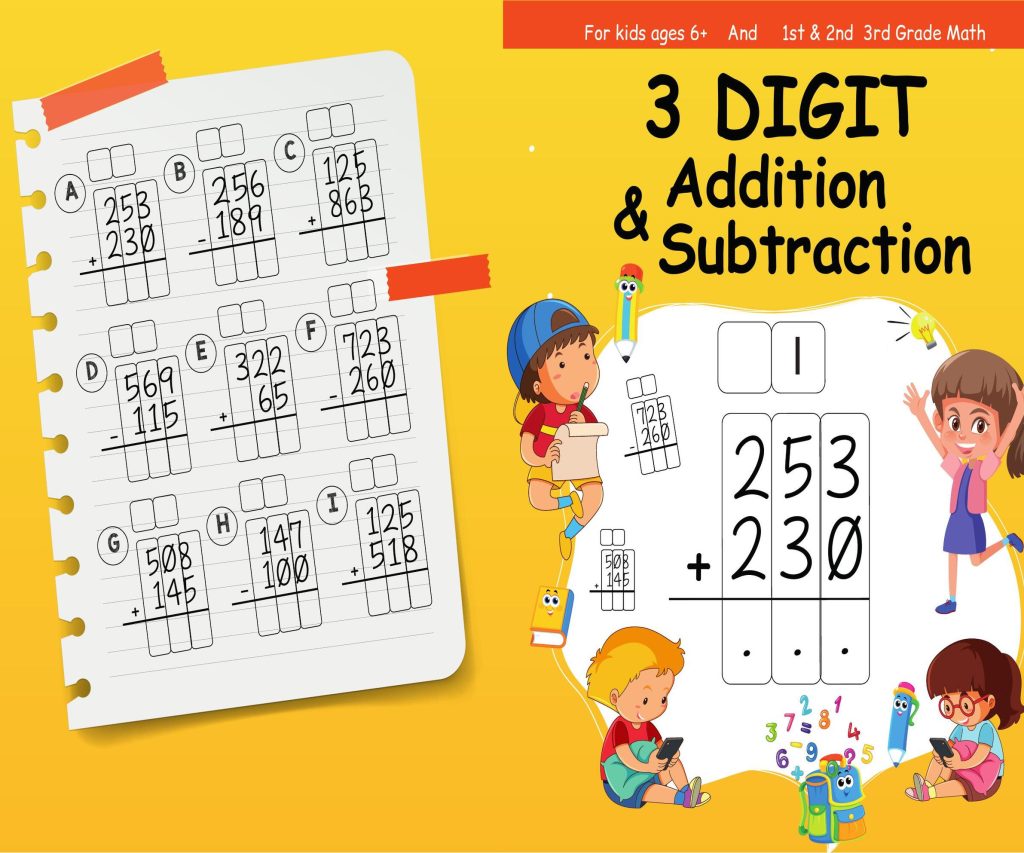 3 Digit Addition and Subtraction Workbook: Fun Activity Book for kids - 8.5×11 PDF
1 × $4.99
3 Digit Addition and Subtraction Workbook: Fun Activity Book for kids - 8.5×11 PDF
1 × $4.99 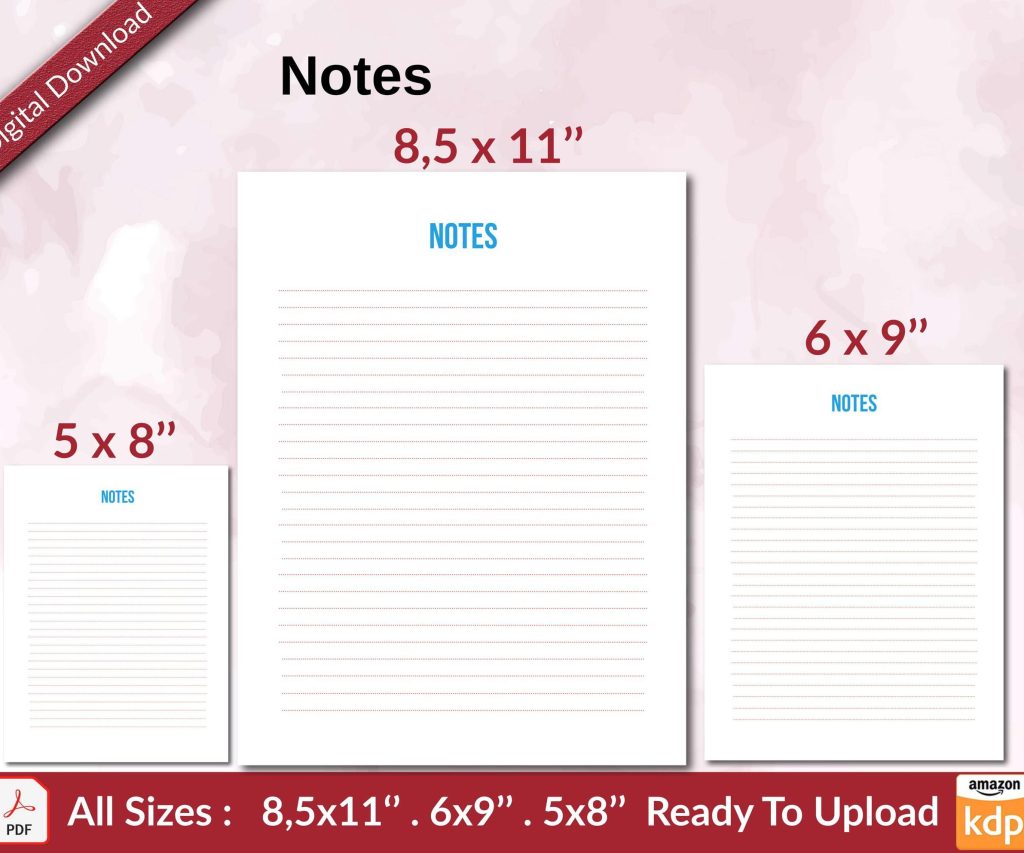 Notes KDP interior Ready To Upload, Sizes 8.5x11 6x9 5x8 inch PDF FILE Used as Amazon KDP Paperback Low Content Book, journal, Notebook, Planner, COMMERCIAL Use
1 × $0.00
Notes KDP interior Ready To Upload, Sizes 8.5x11 6x9 5x8 inch PDF FILE Used as Amazon KDP Paperback Low Content Book, journal, Notebook, Planner, COMMERCIAL Use
1 × $0.00 
DISCOVER OUR FREE BEST SELLING PRODUCTS
Editable Canva Lined Journal: Express Your Thoughts – KDP Template
Lined Pages Journal 120 pages Ready to Upload PDF Commercial Use KDP Template 6×9 8.5×11 5×8 for Notebooks, Diaries, Low Content
Lined Pages Journal 120 pages Ready to Upload PDF Commercial Use KDP Template 6×9 8.5×11 5×8 for Notebooks, Diaries, Low Content
Cute Dogs Coloring Book for Kids | Activity Book | KDP Ready-To-Upload
Daily Planner Diary : Diary Planners for Everyday Productivity, 120 pages, 6×9 Size | Amazon KDP Interior
Wolf Coloring KDP interior For Adults, Used as Low Content Book, PDF Template Ready To Upload COMMERCIAL Use 8.5×11"
Coloring Animals Head Book for Kids, Perfect for ages 2-4, 4-8 | 8.5×11 PDF
Printable Blank Comic Book Pages PDF : Create Your Own Comics – 3 Available Sizes
Notes KDP interior Ready To Upload, Sizes 8.5×11 6×9 5×8 inch PDF FILE Used as Amazon KDP Paperback Low Content Book, journal, Notebook, Planner, COMMERCIAL Use
Black Lined Journal: 120 Pages of Black Lined Paper Perfect for Journaling, KDP Notebook Template – 6×9
Student Planner Journal 120 pages Ready to Upload PDF Commercial Use KDP Template 6×9" 8.5×11" for Low Content book
Recipe Journal Template – Editable Recipe Book Template, 120 Pages – Amazon KDP Interior